What a room of 80 Gulf Coast business owners taught us about the gap between how fast AI arrived and how slowly anyone wrote down the rules.
On September 2, I stood in front of about 80 people at the Carlisle Inn in Sarasota to open the Gulf Coast Builders Exchange AI in Construction series. Contractors, project managers, CPAs, insurance producers, office managers. I asked the room two questions.
First: who here has used ChatGPT or something like it at least once? Most of the hands in the room went up.
Second: who has a written rule at work about how to use it? Almost every hand went down.
Somebody at your company used AI this week. They tried it at home, it helped, and they brought it to work on Monday. Maybe they pasted a contract in to summarize it. Maybe they cleaned up a client email. You did not approve it, you cannot see it, and there is no record it happened.
So the question is not whether your company should adopt AI. Your company already did. The only question is whether you direct it or it keeps happening in the dark.
Here is the good news: you do not need a strategy deck or a six-figure implementation to fix this. You need three rules your whole team can remember, and about an afternoon.
Rule 1: The Account Is the Safety Feature, Not the Logo
Everyone wants to start with a tool shootout. ChatGPT or Copilot? Claude or Gemini? Here is the most freeing thing I can tell you: for the work happening in your office, all four are good. This is Ford versus Chevy, not right versus wrong.
The decision that actually protects your business is not the logo on the tool. It is the account type behind it. A free personal account and a paid business account are two completely different products wearing the same name.
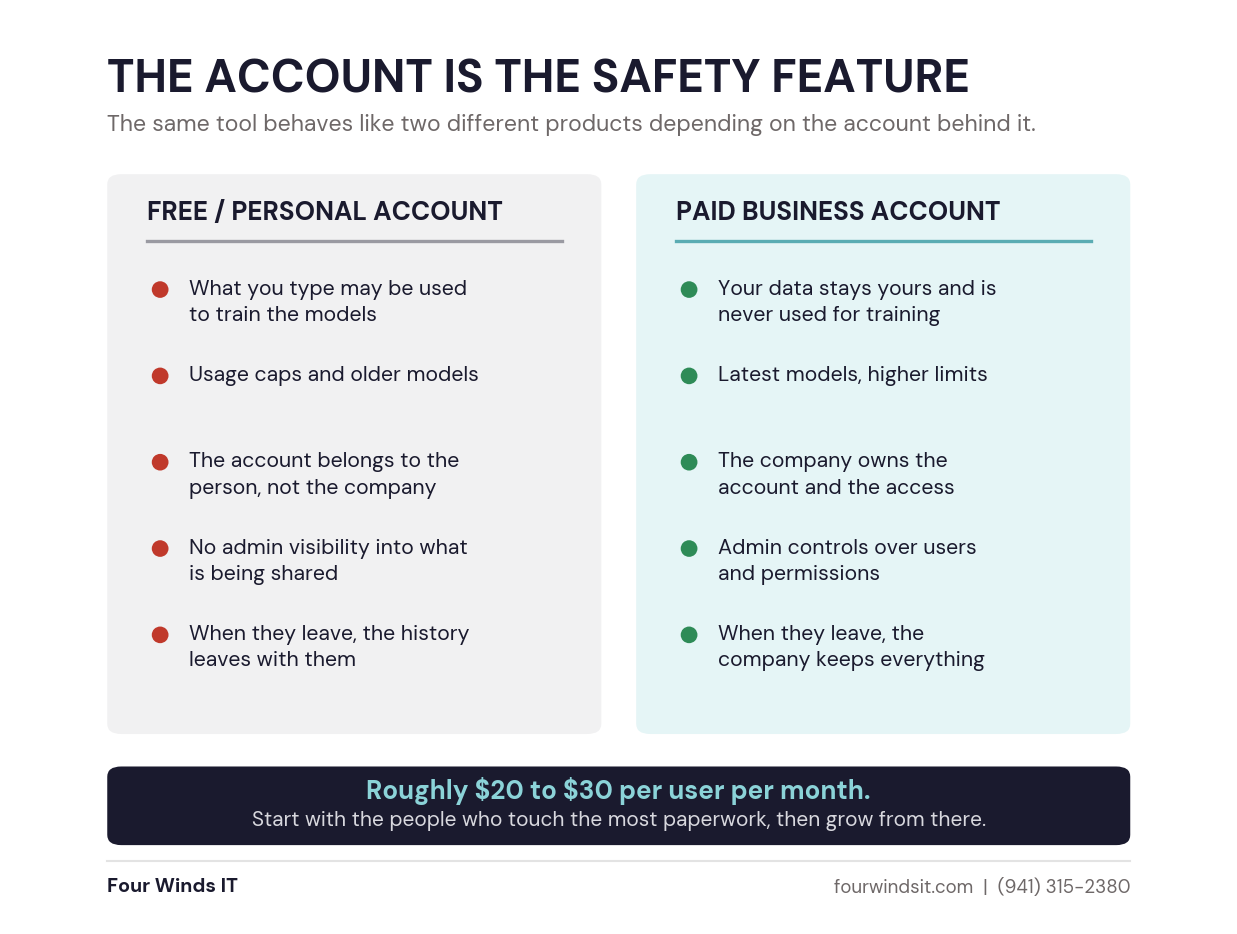
The one that gets overlooked most often is the last line. On a personal account, the license belongs to the employee, not to you. Everything they put into it is theirs. When they leave, they walk out with the account and everything in it, and there is nothing you can do about it. On a business account, the company owns the seat, the history, and the access.
Business licensing runs roughly $20 to $30 per user per month. Before that sounds like a real line item across a full staff, compare it to what you already spend to keep people safe, then ask what a leaked pricing sheet or a client's financials sitting in a consumer chatbot would cost you.
You also do not need everybody on day one. Start with the people who touch the most paperwork: estimating, project management, the office manager, whoever writes the most client emails. Grow from there once the wins are obvious.
Worth checking first: you may already own this.
If your email is Outlook and your files live in SharePoint, a Microsoft AI license sits inside tools you already pay for. We find a lot of companies buying a second platform when the one they own would have covered it. Our Microsoft 365 licensing guide walks through which license you actually need.
Rule 2: Know What Color Your Information Is
Nobody on your team is going to read a 40-page AI policy. They will not remember it, and they will not apply it at 4:45 on a Friday with a proposal due.
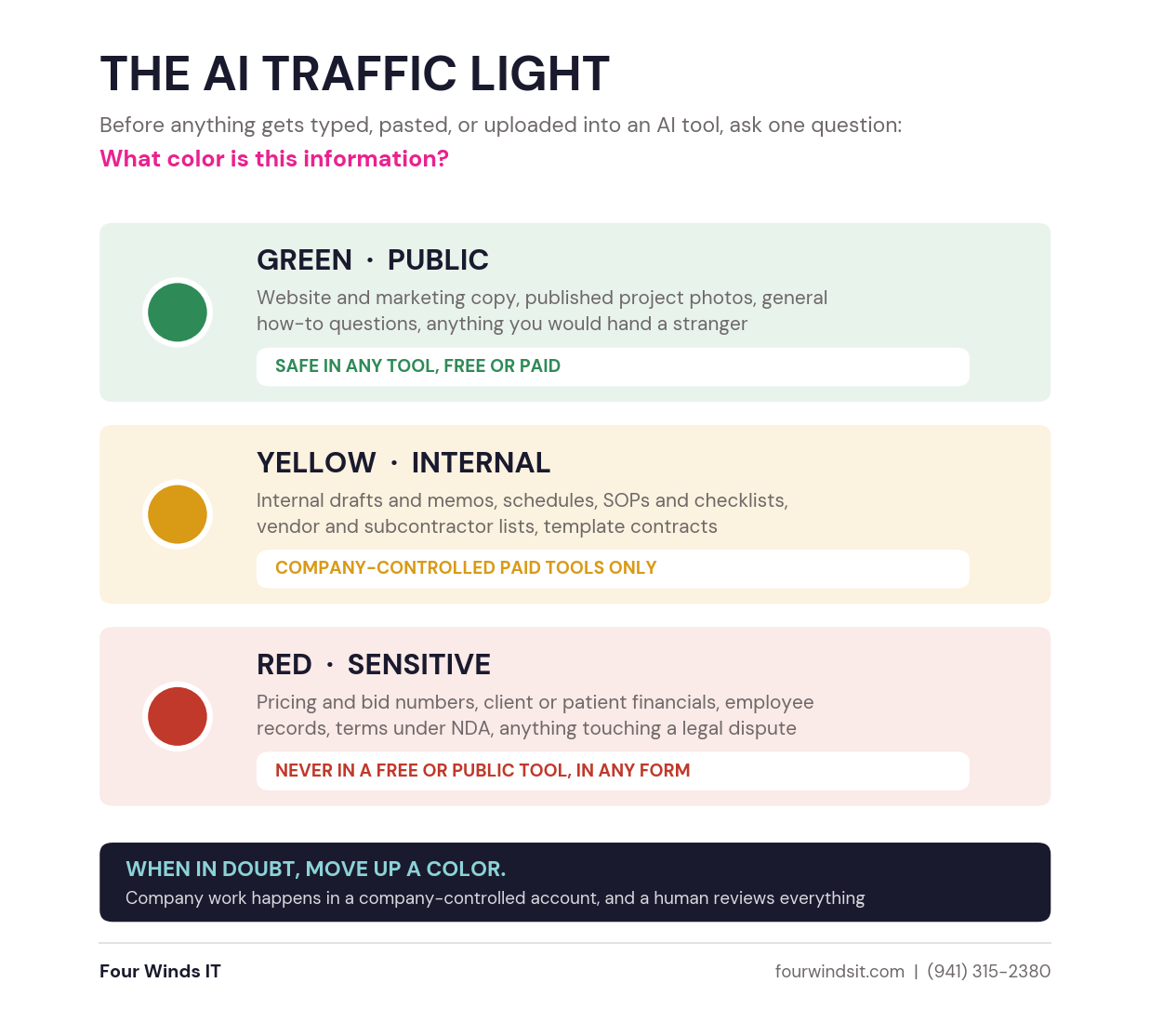
They will remember a traffic light. Before anything gets typed, pasted, or uploaded into an AI tool, one question: what color is this information?
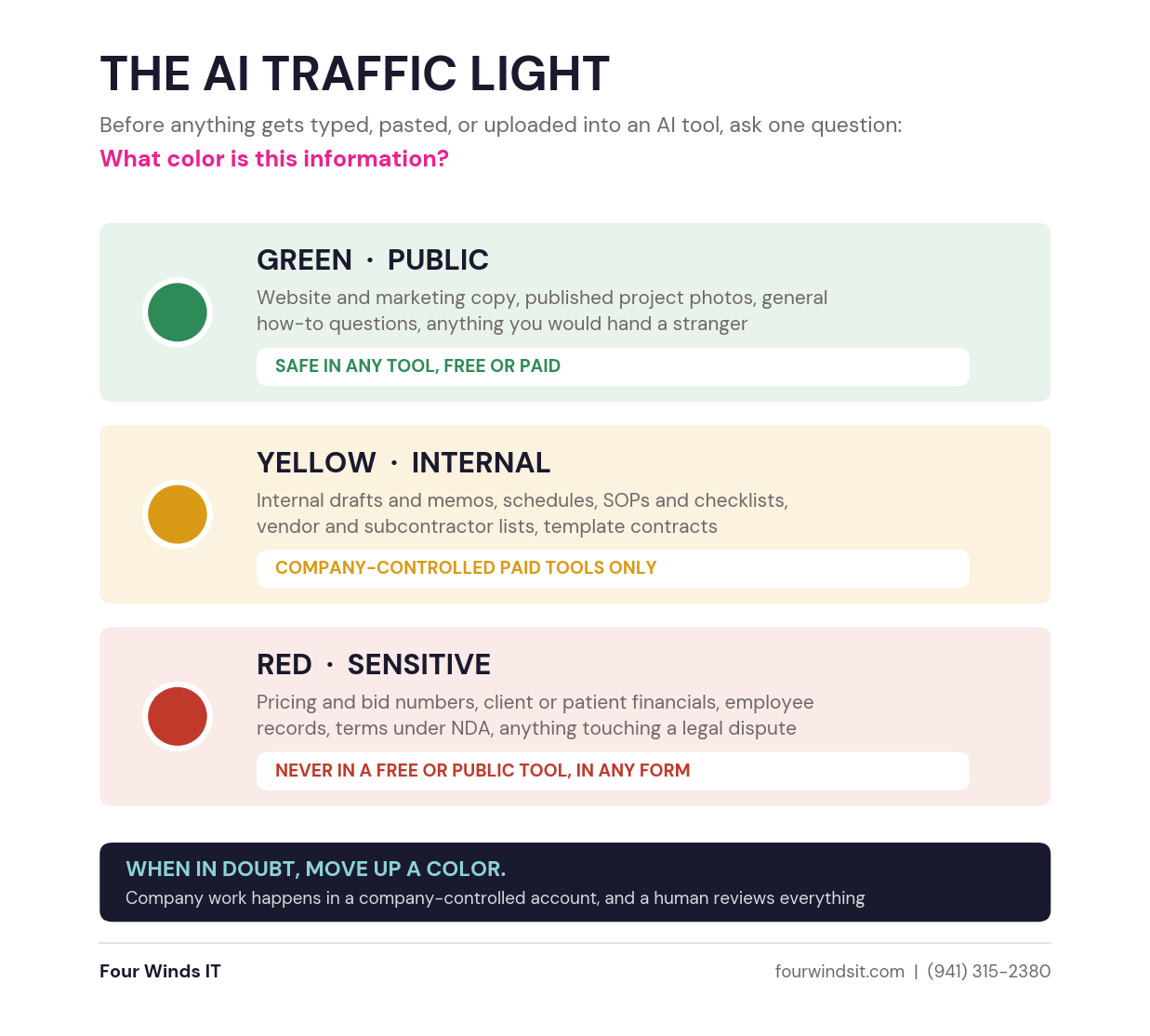
Two rules make it work. When in doubt, move up a color. And if it touches money, a client, or an employee, treat it as red on arrival.
Notice what this does to Rule 1. Most of the genuinely useful work sitting on your team's desk is yellow: internal drafts, schedules, SOPs, vendor lists, template agreements. That work is off the table entirely unless you have given people a company-controlled account to do it in. The account and the color rule are two halves of the same decision.
Rule 3: A Human Signs Off, Every Time
The most useful way to picture these tools is the best intern you ever had, on the day they finally got good. Fast, eager, never tired, and never takes what they learned to a competitor. But brand new. They do not know your market, your jobs, or your clients.
Two failure patterns everyone on your team should know about:
- It makes things up. This is called hallucinating. It can invent a code section, a price, a statistic, even a source, and state it with total confidence. It is not lying, it is autocompleting. Attorneys have been sanctioned for filing briefs with AI-invented case citations. This is not hypothetical.
- It wants to please you. Ask whether your plan is solid and it tends to say yes. Ask it to inflate your own idea back at you and it will happily oblige.
The fix for the second one is the easiest habit in this whole article: make it argue against you. Where is this weak? What would a sharp opposing counsel push back on? My personal favorite is simply asking it to play devil's advocate on what I just asked. That is where it earns its keep.
If AI drafted it and you sent it, it is your work.
Your name, your license, your reputation, exactly as if you had typed every word. The standard of care does not change one inch.
The Part Most Companies Skip: Teaching People to Actually Ask
Rules without capability just produce a policy nobody needed, because nobody was using the tool well enough to get value out of it anyway. Most people type into AI the way they type into Google, three words and hope, then conclude the tool is mediocre. The tool is not mediocre. The ask was.
Here is the recipe we teach in every room:
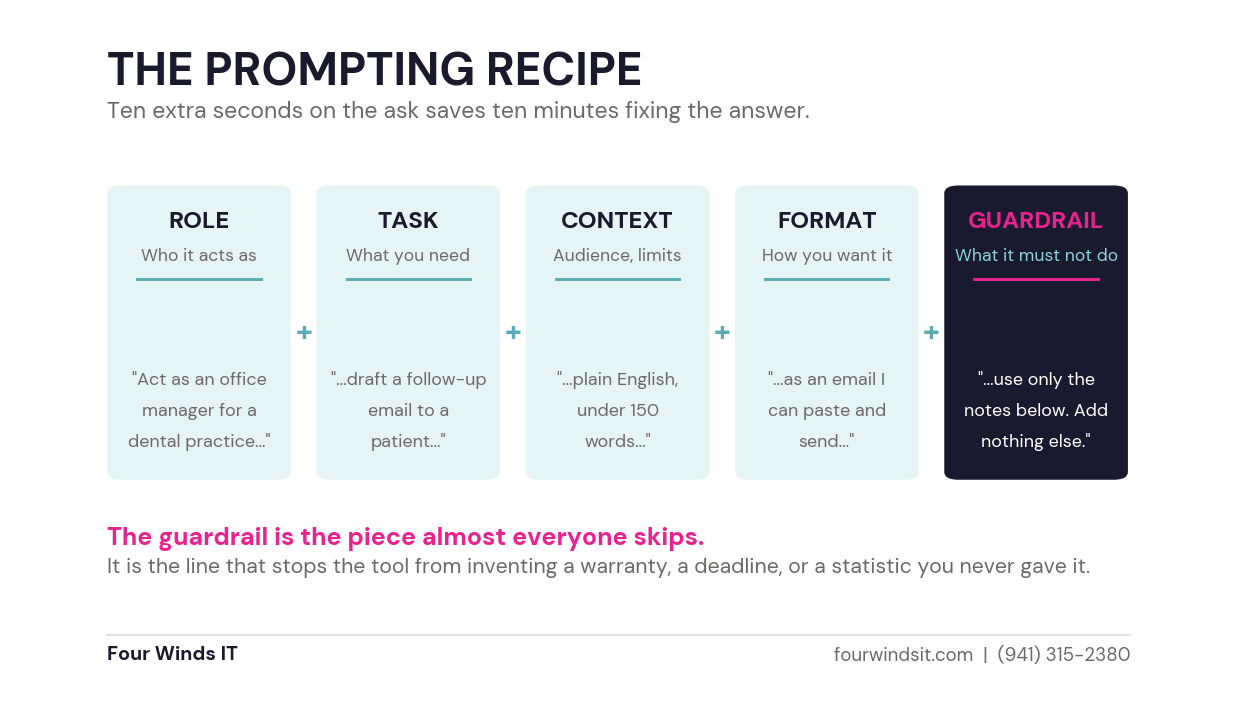
Compare two versions of the same request. Vague: write a follow-up email to a client. What comes back is generic filler that sounds like every other AI email your client has already received this month, padded with commitments you never made.
Guided: act as the office manager for a dental practice, draft a follow-up email covering the work completed today and the two items we recommend addressing soon, plain English, friendly, no scare tactics, under 150 words, use only the notes below and add nothing I have not listed.
Ten extra seconds on the ask saves ten minutes fixing the answer, and the guardrail is what stops a warranty, a deadline, or a number you never offered from landing in front of a client.
What About the Jobs Question?
It comes up in every room, so let me answer it directly. AI is not a people replacer. It is a people empowerment tool.
Enterprise companies lay people off because they had a thousand people doing the same job. Your 30-person company is not that. If you can make five people 20 percent more efficient, that is a person you did not have to hire, doing work you could not otherwise cover. It hands your team their day back from Excel wrangling, meeting recaps, and the busywork they were never hired to do.
That is why adoption is climbing fastest in the industries with the worst labor shortages, and why it is landing on estimating, bidding, and paperwork rather than on the people doing the actual work. We wrote about exactly that in how estimators are replying to three times more RFPs.
What This Looks Like When It Is Set Up Properly
Three rules and a cheat sheet will get you a long way on their own. If you want the governance layer underneath them, here is what we put in place for clients through our AI and business software practice.
- One managed AI platform, so your team can use the leading models through a single company-controlled account instead of five personal ones. Your data stays isolated to your instance and is never used to train the models.
- Admin controls and visibility, so you can see adoption, manage who has access, and remove it the day someone leaves.
- Workflows and agents built around the tasks your team repeats, so the newest hire and the twenty-year veteran produce the same quality of output.
- A written policy that fits your industry, your contracts, and your insurance requirements, reviewed by your own counsel before you adopt it.
- A licensing review first, because a lot of companies are already paying for capability they have not turned on.
We size all of it to the business, the same way we right-size security. A 12-person practice should not carry the same AI governance stack as a 200-person manufacturer, and you should not be sold one that does.
Start This Week
Do not try to move a mountain in week one. Move one pile of paperwork.
- Pick the approved tool and make sure it is a company-controlled account.
- Print the traffic light and teach the color question at your next team meeting.
- Write the one-page policy: the approved tool, the color rule, and who to ask.
- Have one person run the prompting recipe on one real task, and show the room what came back.
Get the toolkit.
The AI Traffic Light one-pager, the prompting cheat sheet, and our AI Acceptable Use Policy starter. Free, no strings. Adapt the policy to your organization and have your own counsel review it before you adopt it.
Want a second set of eyes on what your team is already using? Send us your current setup and we will tell you straight what is exposed and what is fine. No pitch, just a conversation. Call (941) 315-2380.
Get the Free AI Toolkit
Frequently Asked Questions
Is it safe to use ChatGPT at work?
It depends entirely on the account, not the tool. On a free personal account, what you type may be used to train the models, the company has no visibility into it, and the account belongs to the employee rather than the business. On a paid business or enterprise account, your data stays yours, the company controls access, and the history stays with the organization when someone leaves. The same logic applies to Copilot, Claude, and Gemini.
Does a small business really need an AI policy?
Yes, and it does not need to be long. If your staff is already using AI, which they almost certainly are, a one-page policy naming the approved tool, the rule for what information can go into it, and who to ask when someone is unsure will do more than a 40-page document nobody reads. The point is that it gets taught and followed, not that it is comprehensive.
What is the difference between free and paid AI accounts?
Free accounts may use your inputs to train the models, come with usage caps and often older models, belong to the individual rather than the company, and give you no admin visibility. Paid business accounts keep your data out of training, provide the current models and higher limits, give administrators control over users and permissions, and keep the account and its history with the company when an employee departs.
Should we use ChatGPT, Copilot, Claude, or Gemini?
For everyday business work, all four are capable. The practical tiebreaker is where your company already lives. If you run Microsoft 365 with Outlook and SharePoint, Copilot sits inside tools you already pay for. If you are a Google Workspace shop, Gemini is the natural fit. ChatGPT and Claude are the strong standalone options, and Claude in particular handles long documents like contracts well. Using too many at once tends to create more mess than value.
How do we stop employees from using AI on personal accounts?
Banning it does not work, it just pushes usage out of sight. The reliable approach is to give people a sanctioned tool that is genuinely good, make it easy to access, teach the color rule so they know what belongs where, and state clearly in policy that company work happens in the company account. People use personal accounts because nobody gave them a better option.
Dylan Borden chairs the Sarasota AI Business Lab with the Sarasota Chamber of Commerce and serves on the Gulf Coast Builders Exchange Education Committee. Four Winds IT is headquartered in Sarasota, Florida. (941) 315-2380.

 Dylan Borden

 Dylan Borden : Jun 1, 2026, 7:00:01 AM