Multi-factor authentication (MFA) means a stolen password isn't enough to get into your accounts. Microsoft says MFA can block more than 99.2% of account compromise attacks, and it's included at no extra cost in every Microsoft 365 business plan. The catch: it only works if it's turned on for everyone, legacy sign-ins are blocked, and your team knows not to approve a prompt they didn't start.
Here's the real question: not "should we use MFA?" but "is it actually on for every account, and is it the kind attackers can't talk their way past?" We regularly meet businesses that believe they have MFA, then find the owner's account, a shared mailbox or an old admin login that never got it.
Key takeaways
- MFA asks for a second proof, like a tap in an app, after the password. A phished or leaked password alone no longer gets someone in.
- Microsoft reports that more than 99.9% of compromised accounts it sees don't have MFA.
- Not all MFA is equal. Text message codes are the weakest option. App approvals with number matching are better. Passkeys and Windows Hello are the strongest.
- The most common gaps are accounts left out, older email apps that skip MFA entirely, and people approving prompts they didn't request.
What does MFA actually stop?
Most business account takeovers start with a password someone else already has. It was phished by a fake Microsoft login page, reused from a site that got breached, or guessed in a "password spray" that tries common passwords across thousands of accounts. With MFA on, each of those attacks hits a second wall: the attacker has the password but not your phone, your fingerprint or your security key.
Microsoft's own numbers make the case. It says MFA "can block more than 99.2% of account compromise attacks," and that "more than 99.9% of compromised accounts don't have MFA." That's why Microsoft now requires MFA to sign in to Azure and its admin portals.
What most businesses don't realize is what a single compromised mailbox costs. Once an attacker is in, they read your invoices, learn how your team writes, and send a perfectly timed "updated wire instructions" email from a real account. MFA is the cheapest way to stop that before it starts.
Which type of MFA should your business use?
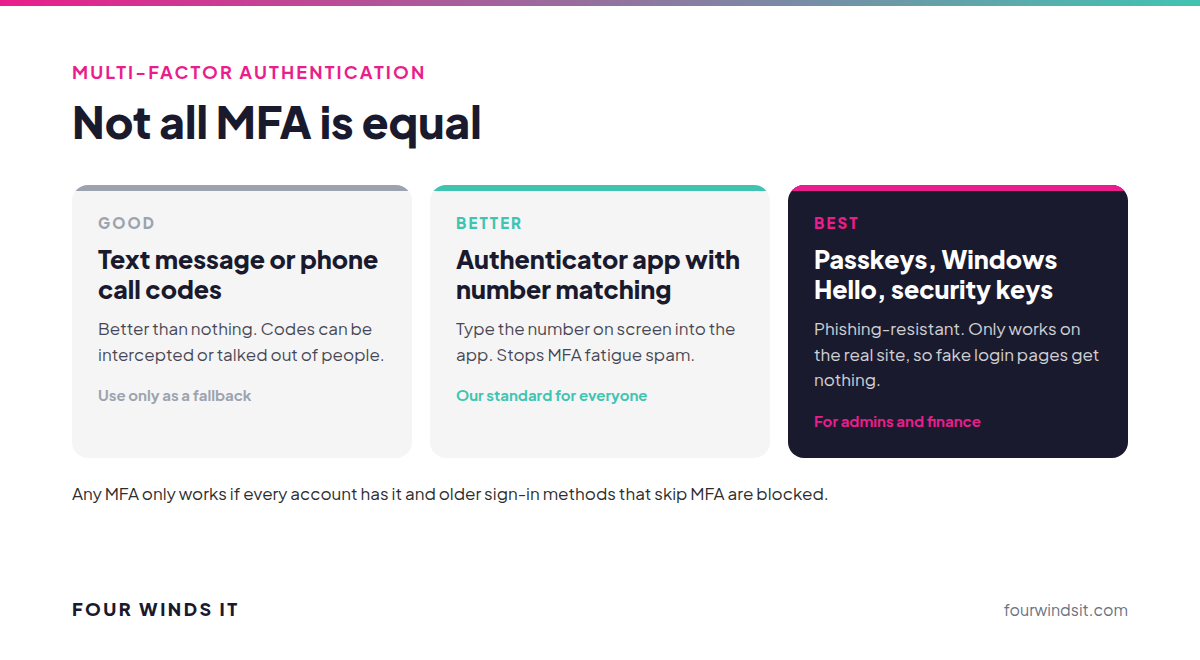
- Text message or phone call codes. Better than nothing, but the weakest option. Codes can be intercepted or talked out of people. Microsoft's security guidance calls SMS codes and basic push notifications "less effective against today's attackers."
- Authenticator app with number matching. The sign-in screen shows a number, and you type it into the app to approve. This is what we set up as the standard for our clients with Microsoft Authenticator. Microsoft turned number matching on for all Authenticator push notifications specifically to stop "MFA fatigue" attacks.
- Passkeys, Windows Hello and security keys. Phishing-resistant: they only work on the real site, so a fake login page gets nothing. Microsoft recommends these as the new baseline, and they're what we recommend for admin accounts and anyone handling money.
For clients who need more control, like MFA on VPNs, remote desktop or non-Microsoft apps, we deploy Duo as a premium option.
What is an MFA fatigue attack?
An attacker who already has your password tries to sign in over and over, sending prompt after prompt to your phone, hoping you'll tap "Approve" just to make it stop. Sometimes they follow up with a call pretending to be IT. Number matching defeats the spam version because you can't approve without the number on the attacker's screen. The rule for your team is simple: if you didn't just try to sign in, deny it and tell IT. An unexpected prompt means someone has your password, so it's time to change it.
Where do businesses get MFA wrong?
- Not everyone is covered. The owner who "doesn't want the hassle," shared mailboxes with passwords, service accounts and former employees' accounts are the ones attackers find.
- Legacy sign-ins are still allowed. Older email connections (POP, IMAP and basic authentication) can't do MFA. Microsoft notes that an attacker "can authenticate by using an older protocol and bypass multifactor authentication." They need to be blocked.
- Nobody watches for problems. Repeated denied prompts or sign-ins from another country are warning signs. Someone needs to see them.
- No plan for a lost phone. Without a backup method and a verified reset process, a lost phone becomes a lockout, or a social engineering opening.
How we roll out MFA without a week of help desk tickets
For most Microsoft 365 clients, we start with Microsoft's security defaults, which require every user to register for MFA, always require it for admins and block legacy authentication, at no extra cost. Then we:
- Find every account, including shared mailboxes, admins and service accounts, and decide what each one needs.
- Check for printers, scanners and old apps that still use legacy sign-ins, and move them to supported methods first so nothing breaks.
- Walk your team through Microsoft Authenticator setup, usually in a single short session.
- Where apps support it, move admins and finance staff to passkeys or Windows Hello.
- Document the lost-phone process so resets go through a verified request, not a convincing phone call.
MFA is part of the "Secured" foundation of our cybersecurity framework, alongside a business-grade firewall, endpoint protection, email security and offsite backup. Pair it with unique passwords from a password manager, covered in our password guide. Not sure where you stand? Take our cybersecurity tier quiz.
Frequently asked questions
What is multi-factor authentication?
MFA requires a second proof of identity after your password, such as approving a sign-in in an authenticator app, using your fingerprint or face, or plugging in a security key. A stolen password alone isn't enough to get in.
Does MFA cost extra with Microsoft 365?
No. Every Microsoft 365 business plan can use MFA through Microsoft's security defaults at no extra cost. Business Premium adds Conditional Access for finer control, like requiring stronger methods for admins or blocking sign-ins from certain countries.
Is text message MFA good enough?
It's far better than no MFA, but it's the weakest option. Codes can be intercepted or talked out of people. An authenticator app with number matching is stronger, and passkeys or Windows Hello are phishing-resistant.
What should an employee do if they get an MFA prompt they didn't request?
Deny it and tell IT right away. An unexpected prompt means someone has that person's password, so it should be changed immediately and recent sign-ins reviewed.
What happens if someone loses their phone?
IT verifies who they are through a set process, removes the old device and helps them register a new one. Having a backup method set up in advance, and a reset process that can't be talked around, keeps a lost phone from becoming a lockout or a security gap.
Can attackers get around MFA?
Sometimes, through MFA fatigue attacks, fake login pages that relay codes, or older sign-in methods that skip MFA. Number matching, blocking legacy authentication and moving key accounts to phishing-resistant methods like passkeys close most of those gaps.
Want MFA turned on the right way?
We get it. Nobody wants a Monday morning of locked-out employees. We roll out MFA in the right order, close the gaps attackers look for and train your team on what to do with an unexpected prompt, with local engineers who answer the phone when someone gets stuck. Talk to our team about your current setup.
Sources

 Dylan Borden : Apr 11, 2025, 12:00:00 PM