Ask a practice manager whether they are in the cloud and the answer comes back fast. Yes. The EHR moved years ago. E-prescribing runs through it, the patient portal is hosted, telehealth was never on-premise to begin with. Somebody checked the box and the conversation moved on.
Then you walk past the room with the server in it. It is usually a closet, sometimes a storage room, occasionally next to the vaccine fridge. Nobody has opened the door in eight months.
That box is almost always where the compliance exposure actually lives.Not because anyone was careless, but because the EHR migration solved the loudest problem and then everyone stopped. What stayed behind is quieter, older, and holds more PHI than most practices realize.
"We Are in the Cloud" Usually Means "Our EHR Is"
The vendor pushed you to move the EHR. There was a project plan, a go-live date, and training. It got done because somebody outside your practice was driving it.
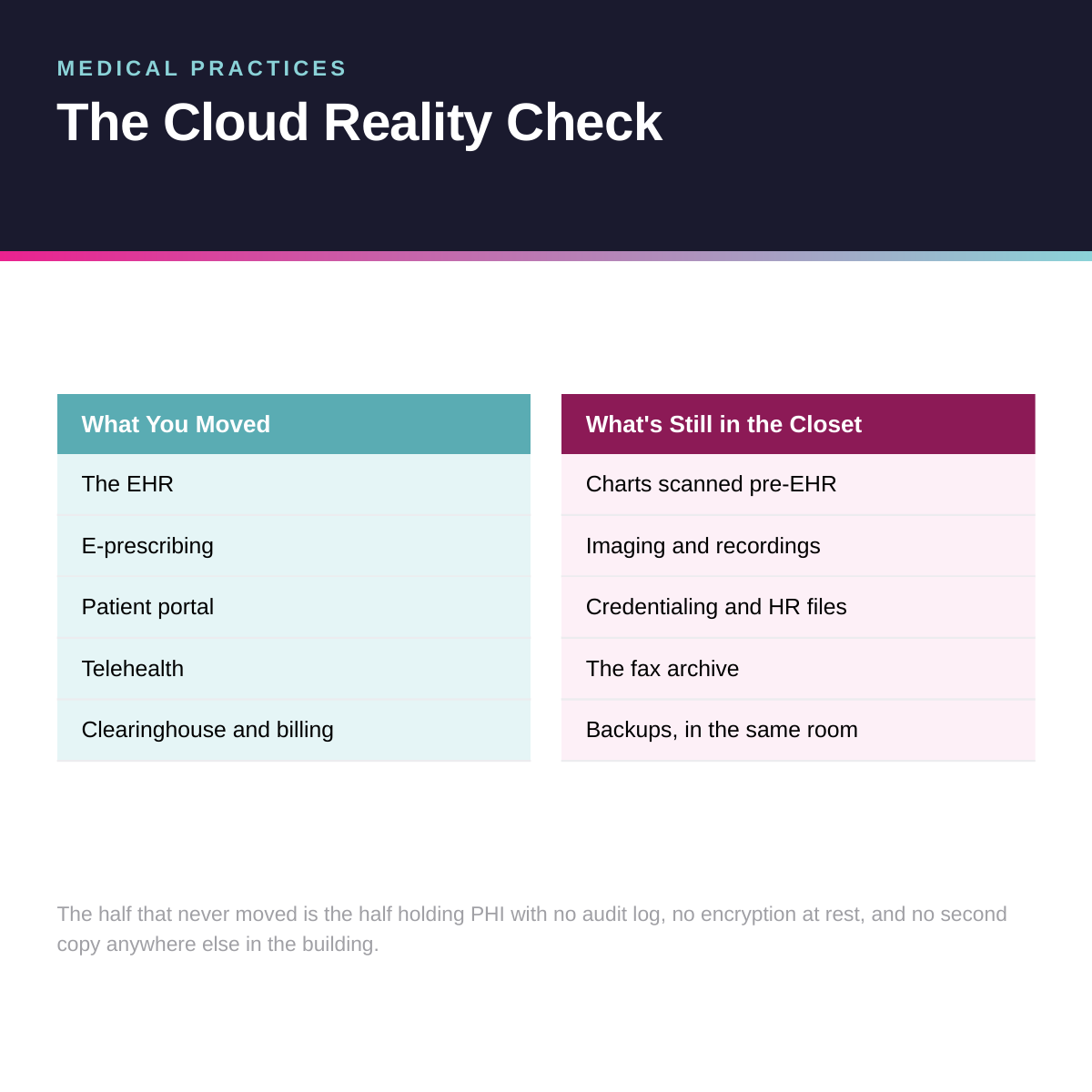
Nothing was driving the rest. So here is what typically stayed put:
Look at the right column. Charts that were scanned before you went electronic. Imaging that was too large to migrate. Credentialing files, personnel records, the fax archive nobody wants to think about. All of it is PHI. Almost none of it has an audit log, and the backup protecting it is sitting in the same room as the thing it is backing up.
The Closet Is Where Your HIPAA Exposure Lives
Your IT provider will tell you the server is fine. They are not lying. It is running, backups report success, nothing is on fire. What does not get said is that you cannotdemonstrateany of it, and demonstration is the entire game with HIPAA.
What the Security Rule Actually Asks You to Prove
The Security Rule is not a list of products. It is a set of safeguards you have to implement and document: access controls, unique user identification, audit controls, person and entity authentication, and protections for data at rest and in transit.
Worth knowing, because a lot of IT providers get this wrong in both directions: encryption at rest is anaddressablespecification, not a required one. Addressable does not mean optional. It means you implement it, or you document why it is not reasonable for your environment and put an equivalent safeguard in place instead. Most practices have done neither, which is the worst of the three options because there is nothing to show an investigator.
A cloud platform generates access logs, encryption status, and authentication records by default. A server in a closet generates them only if someone configured it to, and in our experience nobody did. That is the whole difference. It is not that the closet is insecure. It is that it isundocumented, and undocumented is what gets cited.
How a Scheduling Calendar Became a $111,400 Settlement
This case is worth knowing because nothing dramatic happened in it.
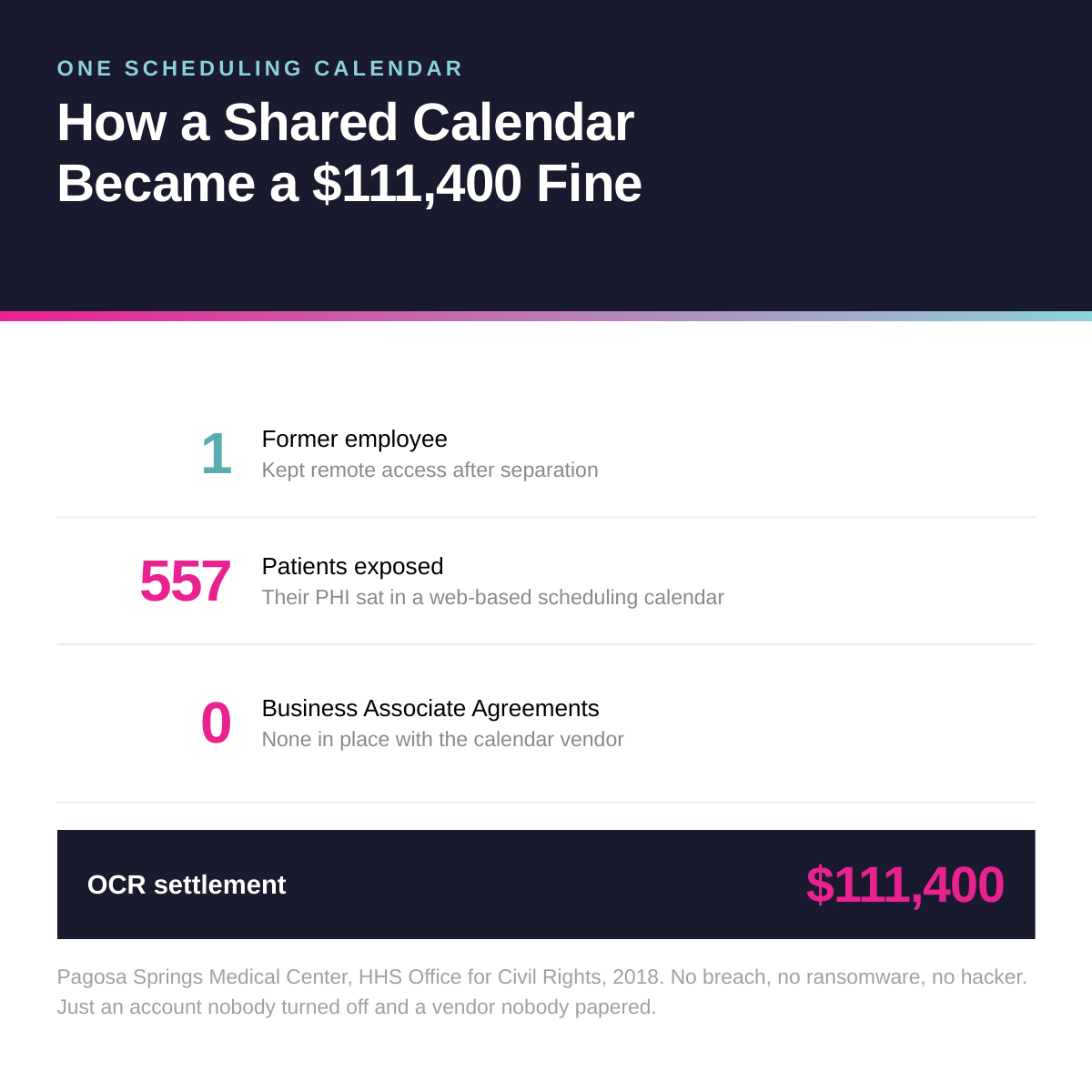
Pagosa Springs Medical Center, a critical access hospital, settled with the HHS Office for Civil Rights in 2018. A former employee kept remote access to a web-based scheduling calendar after leaving. That calendar held PHI for 557 patients. OCR also found the practice had no business associate agreement with the calendar vendor.
No ransomware. No hacker. No breach in the way people picture one. An account nobody turned off, and a vendor nobody papered. The result was $111,400 and a two-year corrective action plan.
Ask your office manager how long offboarding takes at your practice.If the answer involves a checklist across five systems and someone remembering to do it, you have the same exposure. In a properly configured cloud environment, revoking access is one action, it is logged, and it happens the same day.
Every Tool That Touches PHI Needs a BAA
The second half of that settlement is the part practices miss. You almost certainly have a BAA with your EHR vendor, because they handed you one at signing. The question is everything else.
The scheduling tool. The transcription service. The appointment reminder platform. The secure messaging app somebody on staff started using. Your cloud backup provider. Your IT provider.
That last one matters more than most practice owners realize. If your IT company can access systems containing PHI, they are a business associate under HIPAA and they need a signed BAA. Many providers do not offer one. If yours has never brought it up, that is your answer, and it is worth asking before an auditor does. Four Winds signs a BAA with every healthcare client, which means we are accountable under HIPAA alongside you rather than adjacent to it.
Microsoft signs a BAA covering Microsoft 365, so moving files and email into that environment does not create a gap. It closes one, because you get the audit logging and access controls that the closet server never produced.
What the Box Costs You Every Five Years
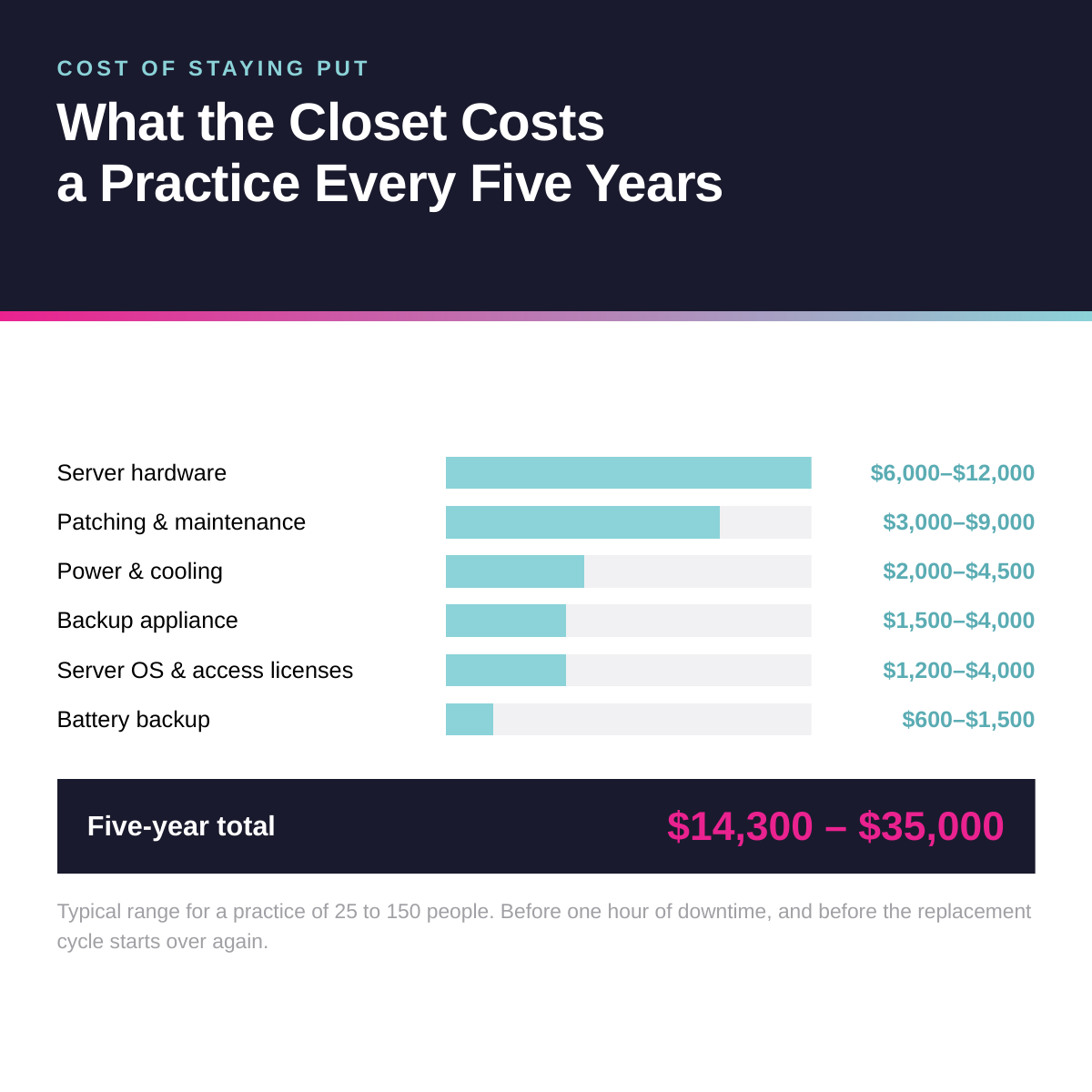
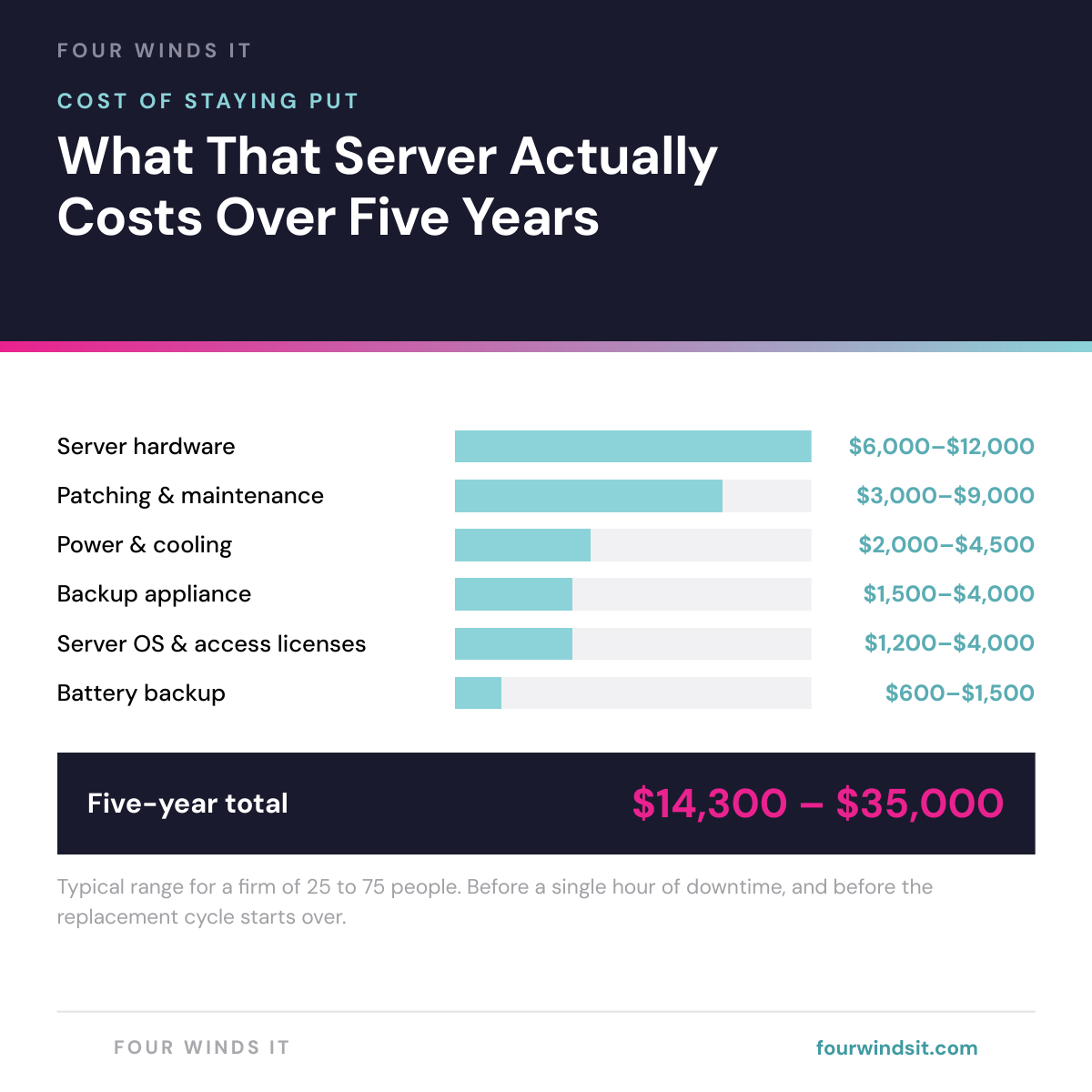
Set compliance aside for a second and look at it as a line item. Most practices treat the server as a sunk cost, because it was paid for years ago and it feels free. It is not free. It just never shows up as a single number anywhere.
That is before downtime. And in a practice, downtime is not an inconvenience, it is cancelled appointments. Employees lose an average of 91 hours a year to IT issues according to Robert Half, which across a 40-person practice is roughly 3,600 hours of paid time spent waiting on technology.
Then there is the tail risk. The average healthcare data breach runs $6.64 million, per IBM's 2026 Cost of a Data Breach report, and healthcare has been the costliest sector for thirteen straight years. Average ransomware downtime is 24 days. A practice cannot absorb 24 days.
Adding a Provider Should Not Take Six Weeks
The other cost is the one that shows up when you grow, which in Southwest Florida most practices are doing.
When infrastructure lives in one building, a second location means duplicating it or running a VPN tunnel between sites and hoping it holds. Providers cannot see records across locations. Schedules do not sync. Onboarding a new provider means someone physically configuring a workstation and waiting on access.
When identity and files live in the cloud, adding a location is a network connection and adding a provider is an account. Your practice stops being limited by where the hardware is.
Right-Size It Instead of Over-Buying It
Here is where we differ from most providers pitching healthcare: HIPAA scales with the size and scope of your practice. A five-person office should not be running the same security stack as a hundred-person multi-site group. Sizing a small practice into an enterprise stack burns budget that should have gone to the policies and procedures that actually get you compliant.
The same logic applies to licensing, and there is money sitting there right now. Microsoft raised prices on July 1, 2026. Business Standard went from $15.00 to $16.80 per user per month on month-to-month pricing. Business Premium did not move at all, holding at $26.40.
That closed the gap between them from $11.40 to $9.60.Premium is the tier carrying device management, conditional access, and the access logging that answers the questions in this article. For under ten dollars a month on the people who actually handle PHI, that is one of the cheapest compliance improvements available to a practice.
The other half is that most practices license everyone identically, which is almost never right. Your providers, your billing staff, your front desk, and the medical assistants who share a workstation between rooms have genuinely different needs. Frontline plans exist for shift workers who share a station and rarely open a desktop app, and almost nobody uses them. OurMicrosoft 365 licensing guidewalks through every tier.
Worth asking your provider directly: what are you charging me per Microsoft license versus what Microsoft charges, and do you reconcile seats when someone leaves? Four Winds passes vendor pricing straight through with no markup and reconciles monthly, which is part ofhow we price and what we do not mark up.
How to Find Out Where You Stand
None of this needs a consultant to diagnose. It needs twenty minutes and an honest inventory.
We built a twenty-one point checklist covering what is still on your hardware, what happens if it fails, where your licensing money is going, and what a migration would actually cost. It ends with a one-page summary designed to be filled in and handed up, because at most practices the person doing this research is the operations or finance lead, and the person approving the spend is the physician owner.
Download theCloud Readiness Guide, run the inventory, and count your flags.If you want a second set of eyes, send it to us and we will return a findings summary with a cost estimate and a recommended sequence within 48 hours. No charge, no meeting required.
Frequently Asked Questions
Is cloud storage HIPAA compliant for a medical practice?
Yes, when it is configured correctly and covered by a business associate agreement. HHS guidance confirms that cloud service providers handling PHI are business associates and must sign a BAA, and Microsoft signs one covering Microsoft 365. HIPAA does not prohibit cloud storage. It requires safeguards you can document: access controls, unique user IDs, audit controls, and authentication. In practice a properly configured cloud environment produces that documentation automatically, while an on-premise server produces it only if someone deliberately configured it to.
Do we need a business associate agreement with our IT provider?
If your IT provider can access systems that contain protected health information, yes. They meet the definition of a business associate under HIPAA and a signed BAA is required. Many IT providers do not offer one, and if yours has never raised it, that is worth resolving before an audit does. The Pagosa Springs settlement included a missing BAA with a scheduling calendar vendor as part of the violation, which shows OCR does look at vendor relationships and not just your own systems.
What happens to our EHR if we move everything else to the cloud?
Nothing. If your EHR is already hosted, it is unaffected. This work is about the files, identity, backup, and infrastructure sitting underneath it: scanned records, imaging, credentialing and HR files, shared drives, and the permissions structure. Those move to SharePoint and OneDrive and get covered by proper access controls and logging. If your EHR is still running on a local server, that becomes part of the migration conversation, and in most cases the vendor now offers a hosted version.
How long does it take a medical practice to move off its server?
For a practice of 25 to 150 people, expect two to four weeks. Identity and file storage move first, then backup and device management, with any remaining line-of-business application typically scheduled for a following quarter. Data copies in the background overnight and on weekends while the practice keeps seeing patients on the current system, and the cutover happens on a weekend. Staff usually notice a short training session and a different path to their files.
What does a HIPAA violation actually cost a small practice?
It varies widely with the nature of the violation and the level of culpability. As a reference point, Pagosa Springs Medical Center settled for $111,400 plus a two-year corrective action plan over a single failure to terminate a former employee's access, affecting 557 patients. Separately, IBM's 2026 Cost of a Data Breach report puts the average healthcare breach at $6.64 million, the highest of any sector for the thirteenth consecutive year. The more useful framing for a small practice is that most enforcement actions come from ordinary process failures like offboarding and missing BAAs, not sophisticated attacks.
Not sure how much of your practice is actually in the cloud?
Run the twenty-one point inventory in our Cloud Readiness Guide, or send us your current setup and we will tell you where you stand. No sales pitch, just an honest assessment.
Dylan Borden is VP of Operations at Four Winds IT, a managed IT company headquartered in Sarasota, Florida. Four Winds serves 300+ businesses across Southwest Florida with a focus on transparent pricing and actually answering the phone.Connect with Dylan

 Dylan Borden : Sep 28, 2026, 8:00:00 AM