I want you to do something right now. Pull up last month's IT invoice and try to explain every line item to me.
If you can't — you're not alone. Most business owners we talk to can't either. And their IT provider is counting on that.
I'm not saying every IT company is intentionally hiding things. Some of the charges I'm going to walk you through are just industry norms that nobody bothers to question. But 'that's how everyone does it' doesn't mean it's fair or that you should keep paying for it.
We've reviewed hundreds of IT invoices from businesses across Florida. Here's what we find almost every time.
Hidden Cost #1: Platform Base Fees — Paying Your Provider to Use Their Own Tools
This one makes me genuinely frustrated every time I see it.
Many IT providers tack monthly 'platform base fees' onto your invoice. These are line items for the software they use to monitor, manage, and secure your environment. Things like their RMM tool (the software that lets them see your computers), their ticketing system, their security monitoring platform.
Here's the thing: these are tools your IT provider needs to do their job. They aren't optional licenses you selected. They aren't services you asked for by name. They're internal tools your provider uses, billed back to you at $100 to $175 per platform per month.
Run two or three platforms and you're paying $200 to $525 a month — on top of your per-device rate — for tools you didn't choose and can't access.
Hidden Cost #2: Microsoft License Double-Dipping
Most IT providers handle your Microsoft 365 licensing. That's normal and fine. What's not fine is what they add on top of it.
The pattern looks like this: your provider charges you Microsoft's standard licensing cost, then adds a per-seat 'management fee' of $0.50 to $2 per user per month just for managing the licenses you're already paying for. On 40 users, that's up to $960 a year for work that any competent IT provider should consider standard.
But the worse issue is ghost seats. When an employee leaves your company, most IT providers keep billing that seat until someone notices. Nobody proactively reconciles the license count. We've walked into environments where businesses were paying for 3, 4, sometimes 8 users who hadn't worked there in over a year.
We charge exactly what Microsoft charges. No management fee on top of it, no surcharge. And we reconcile seat counts every month when someone leaves — because that's what you're supposed to do.
Hidden Cost #3: Per-GB Backup Pricing — A Bill With No Ceiling
Backup is one of those things where the pricing model matters as much as the service itself.
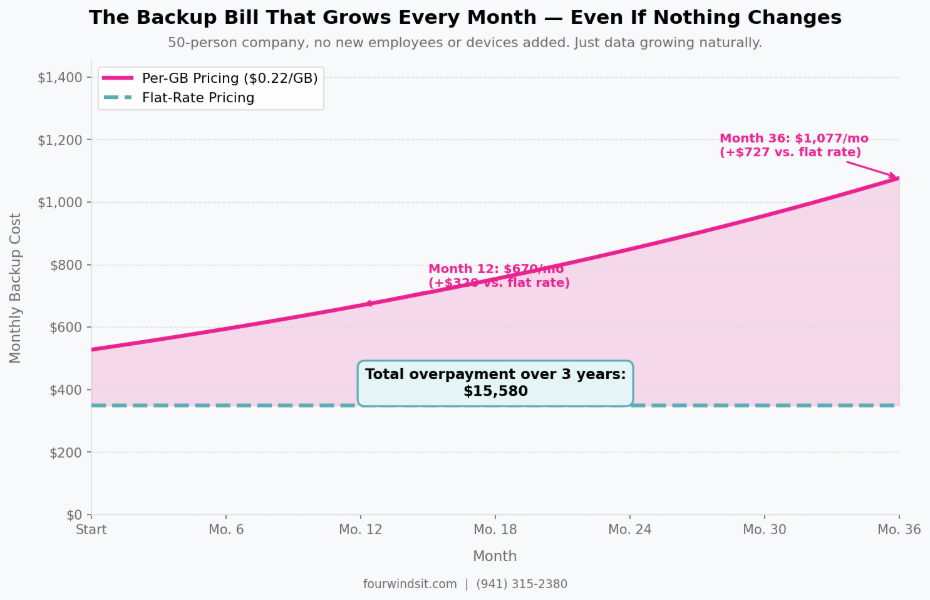
Per-GB backup pricing is common: $0.15 to $0.25 per gigabyte per month. It sounds reasonable until you realize your data grows every month. New files, new emails, new project folders, new client records — all of it accumulates. Your backup bill grows with it.
Nobody sends you a notification when it increases. You'd have to pull two invoices side by side and do the math yourself. Most people don't.
A 50-person company can see backup costs climb $50 to $100 per month, year over year, with no new employees, no new devices. That's $600 to $1,200 a year gone to a pricing model that only benefits one party — and it isn't you.
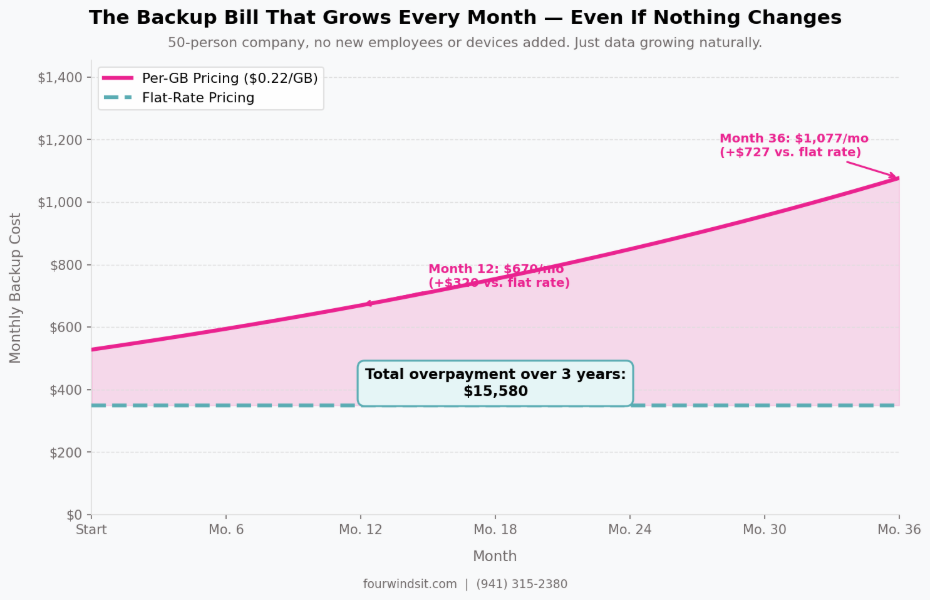
Fig. 1: Per-GB backup cost growth over 36 months vs. flat-rate pricing. Same company, no new employees or devices added.
Flat-rate backup pricing fixes this. What you pay month one is what you pay month 36. We don't benefit from your data growing, so we don't have a reason to let it go unchecked.
Hidden Cost #4: Offboarding Fees — The Price of Leaving
Most people don't think about what it costs to leave their IT provider until they're trying to leave. That's exactly what these providers count on.
Offboarding fees — also called 'transition fees' or 'data migration fees' — typically run $1,000 to $3,500 or more. They cover things like handing over network documentation, transferring credentials, and basic coordination with your incoming provider. Documentation and credential management are things your IT provider should have been maintaining all along. Charging to hand it over on the way out is a deliberate friction tactic.
The message is clear: leaving is expensive. Stay.
We charge $0 to leave. We maintain proper documentation because that's good IT practice, not because we're planning to hold it hostage. If you want to go, we'll help your new provider get up to speed. We'd rather have an amicable exit than a resentful client who stays.
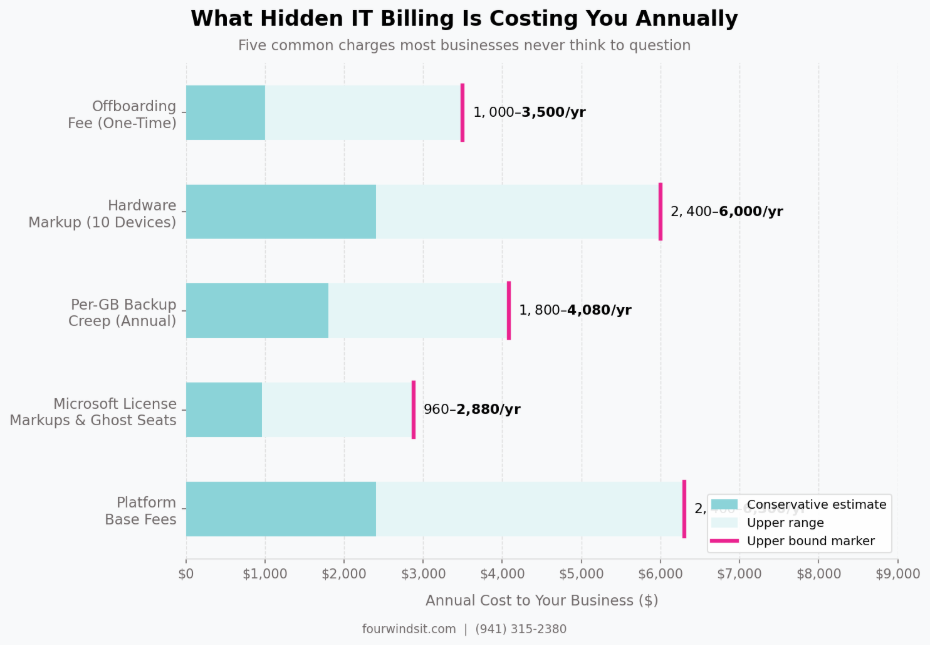
Fig. 2: Annual cost ranges for five common hidden IT billing charges. Ranges reflect company size, hardware volume, and backup data growth.
What Transparent Billing Actually Looks Like
Transparent billing isn't complicated. It just requires an IT provider who doesn't benefit from your confusion.
Here's what it means in practice:
- One per-device rate that covers support, monitoring, patching, and updates — not a base rate plus a list of add-ons for things that should be included
- Microsoft 365 at exact vendor pricing — no surcharge, no management fee layered on top, and monthly reconciliation when headcount changes
- Flat-rate backup pricing so your bill doesn't grow as your data does
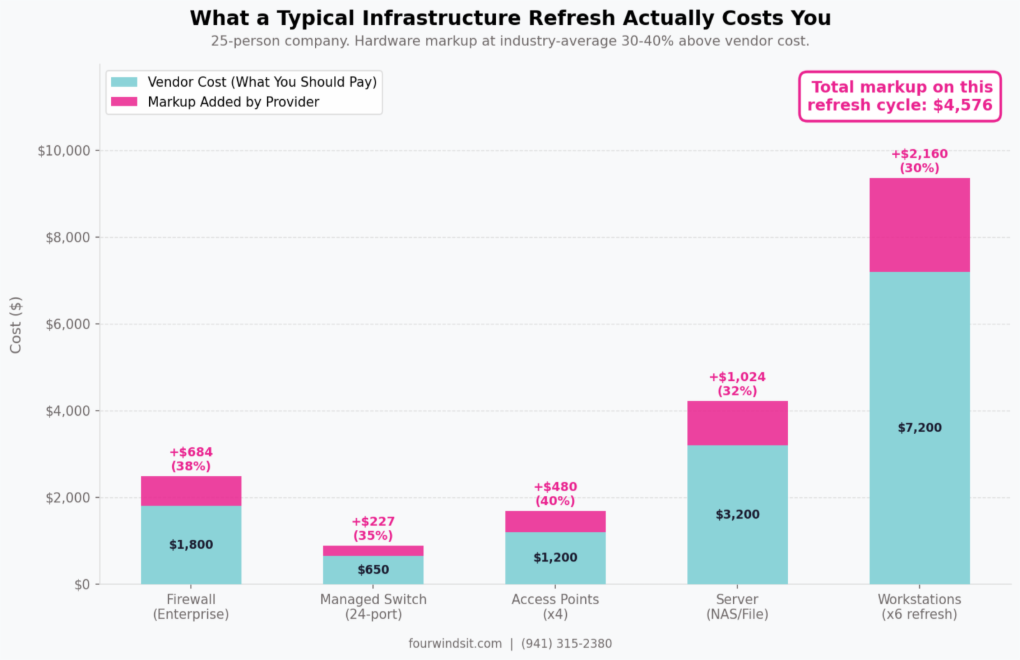
- Hardware at cost — if you need a server, a firewall, or a workstation, you pay what it costs. No markup. Setup included.
- Zero offboarding fees — documentation maintained properly from day one, transferred cleanly on the way out
- Ask for an itemized breakdown of every platform or software base fee on your invoice. Any fee not tied to a license you selected is worth questioning at renewal.
- Ask what your per-Microsoft-365-seat charge is versus what Microsoft charges directly. If the numbers don't match, you're paying a surcharge that probably wasn't disclosed.
- Pull your backup invoice from 12 months ago and compare it to today's. If it went up and you didn't add people or devices, you're on per-GB pricing with no ceiling.
- Ask what it costs to leave. Get it in writing. If the answer is more than zero, that's a number worth understanding before your contract auto-renews.
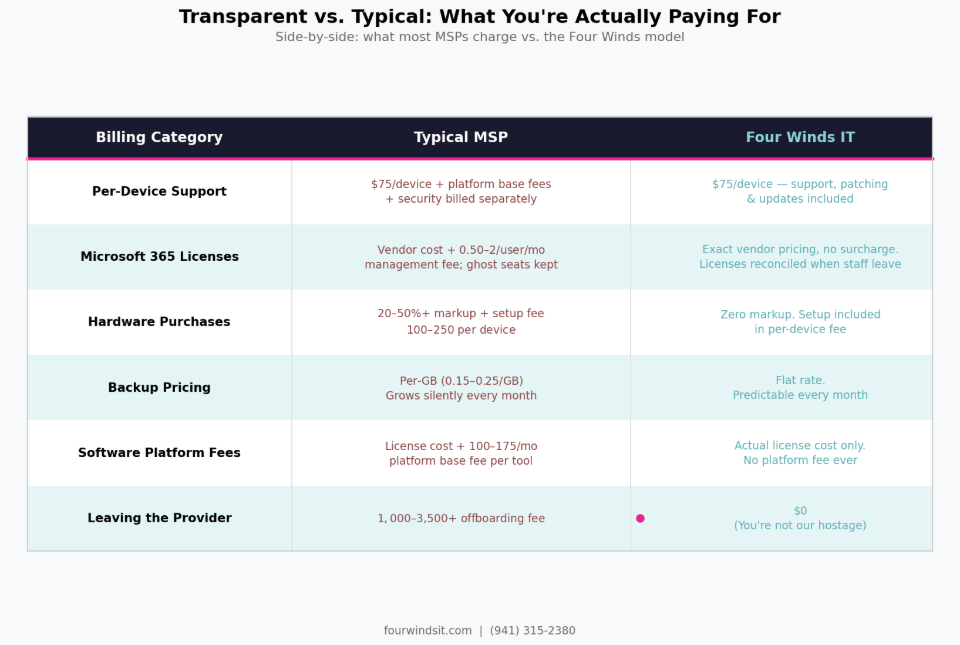
Fig. 3: Typical MSP billing practices vs. the Four Winds model across six cost categories.
What to Do With Your Invoice Right Now
You don't need to switch IT providers to get value from this article. Start with these four questions — in writing — to your current provider:
Frequently Asked Questions
How common are these hidden IT billing practices?
Common enough that we see at least two or three of them on almost every invoice we review. Platform base fees and Microsoft license surcharges are the most frequent. Per-GB backup with no ceiling is close behind. Offboarding fees are less universal but tend to show up in contracts from larger or private-equity-backed MSPs.
Is my IT provider required to disclose these fees upfront?
Not in any meaningful regulatory sense. These charges are technically disclosed — they're on your invoice. But 'disclosed' and 'explained clearly' are two different things. Most clients sign service agreements without understanding that platform fees are separate from the base rate, or that backup pricing is variable. Ask for a plain-English explanation of every line item before you sign anything.
How do I know if I'm paying a hardware markup?
Ask directly: 'What is your markup policy on hardware purchases?' If they can't give you a straight answer, that answer is almost certainly yes. The cleaner test: find the vendor price yourself on a specific item — a Dell workstation, a firewall model — and compare it to what you're being quoted. Any gap above standard reseller pricing is markup.
What should a fair IT invoice look like for a 25-person business?
A clean invoice for a 25-person business should have a few clear line items: a per-device or per-user support rate, Microsoft licensing at vendor cost, flat-rate backup, and any security tools billed at actual license cost. If your invoice has more than 8-10 line items and you can't explain what each one covers, that's worth investigating.
Do you charge platform fees or management fees on Microsoft licenses?
No. We charge exactly what Microsoft charges for licensing — the same price you'd pay if you bought direct. No management fee, no surcharge. And we review seat counts every month so you're never paying for someone who's already left the company. Platform tools are ours — we use them to do our job, and we don't bill them back to you.


 Dylan Borden : Apr 6, 2026, 8:15:00 AM