Nobody at your firm thinks about the server. That is sort of the point of it. It sits in a closet or a back room, it hums, and as long as the shared drive opens when someone double-clicks it, it never comes up in a partner meeting.
Then it does come up. Usually on a Tuesday, usually around a filing deadline, and usually in the form of somebody standing in a doorway saying the drive will not open.
Here is the part that gets missed: you are already making a decision about that server. You are making it by not making it.Every year it stays in the closet is a year you have chosen to keep paying for it, chosen to carry the risk it creates, and chosen to let the hardware pick the timing of the replacement instead of picking it yourself.
The Decision You Are Making by Not Making It
A server has roughly a five-year useful life. After that you are running past warranty, on hardware the manufacturer has stopped caring about, with a failure probability that climbs every quarter. Most firms we talk to cannot tell us what year theirs was purchased. That is not a knock on them. It is nobody's job to track it, so nobody does.
But the bill arrives on schedule whether it is in the budget or not. And when it arrives unplanned, it arrives with an emergency premium attached: expedited hardware, after-hours labor, and however many billable days you lose while you wait for a box to show up.
What That Box Actually Costs Your Firm Over Five Years
People think of the server as a sunk cost. It was paid for years ago, so it feels free. It is not free. It just does not show up as a single line item anywhere, which is a different thing entirely.
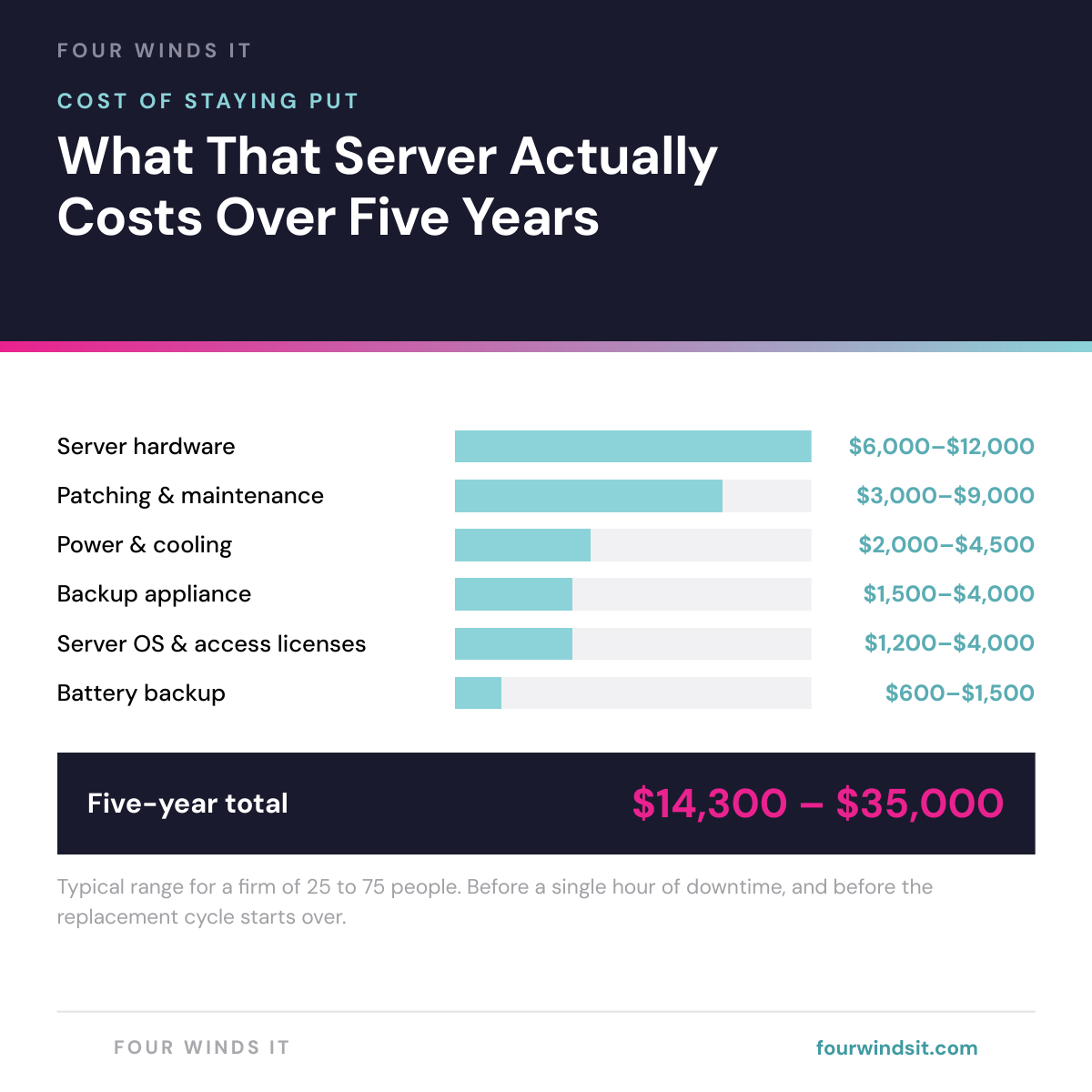
Here is what a five-year cycle actually runs for a firm of 25 to 75 people:
Add the emergency response when it eventually fails and most firms land in the high twenties to mid thirties. Then the clock resets and you do it again.
The Cost That Never Appears on an Invoice
The hardware math is the easy part. The expensive part is what the friction does to billable time.
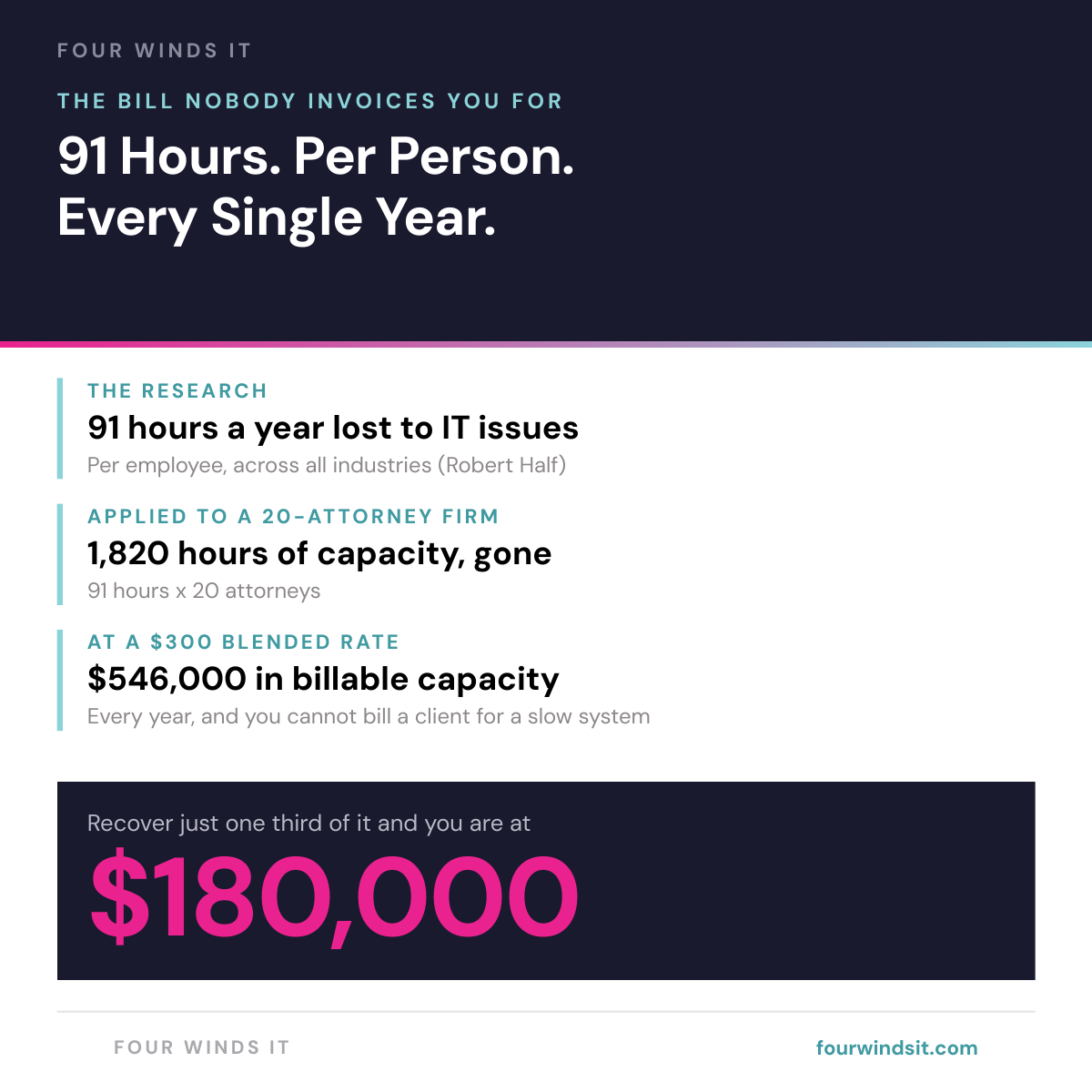
Employees lose an average of 91 hours a year to IT issues, according to Robert Half. That is not catastrophic downtime. That is the accumulated drag of waiting for a document search to return, of a remote session that drops mid-brief, of a laptop that takes four minutes to become usable in the morning. It is exactly the kind of loss thatIT support built around billable hoursis supposed to prevent.
You cannot bill a client for a slow system. Those hours do not get rescheduled, they just evaporate, and they show up months later as a realization rate that nobody can quite explain.
And this is before you count a real outage.One hour of firm-wide downtime for twenty attorneys at a $300 blended rate is $6,000 of billing capacity, gone, plus whatever the deadline consequences turn out to be. Courts are famously unsympathetic to technology problems.
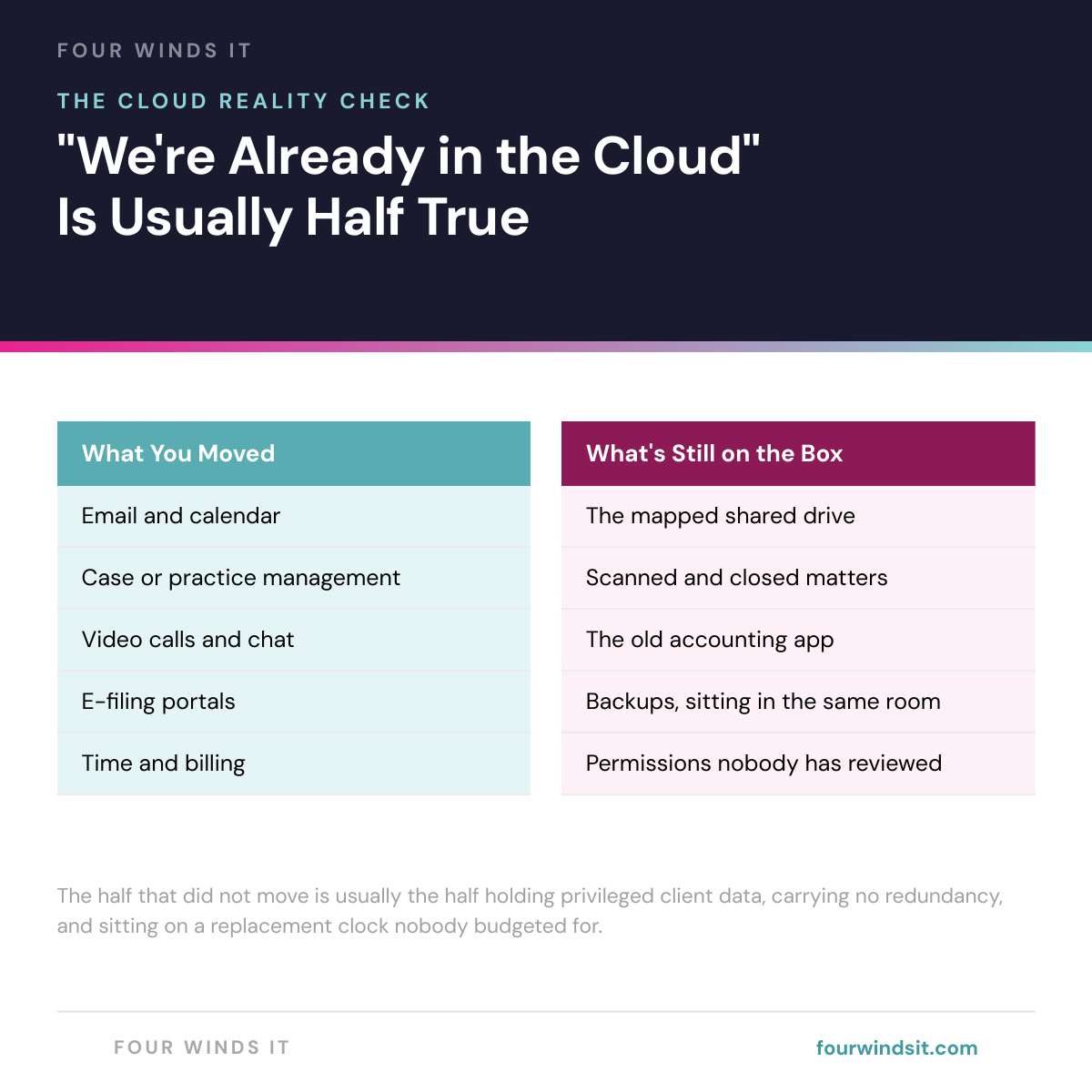
"We Are Already in the Cloud" Is Usually Half True
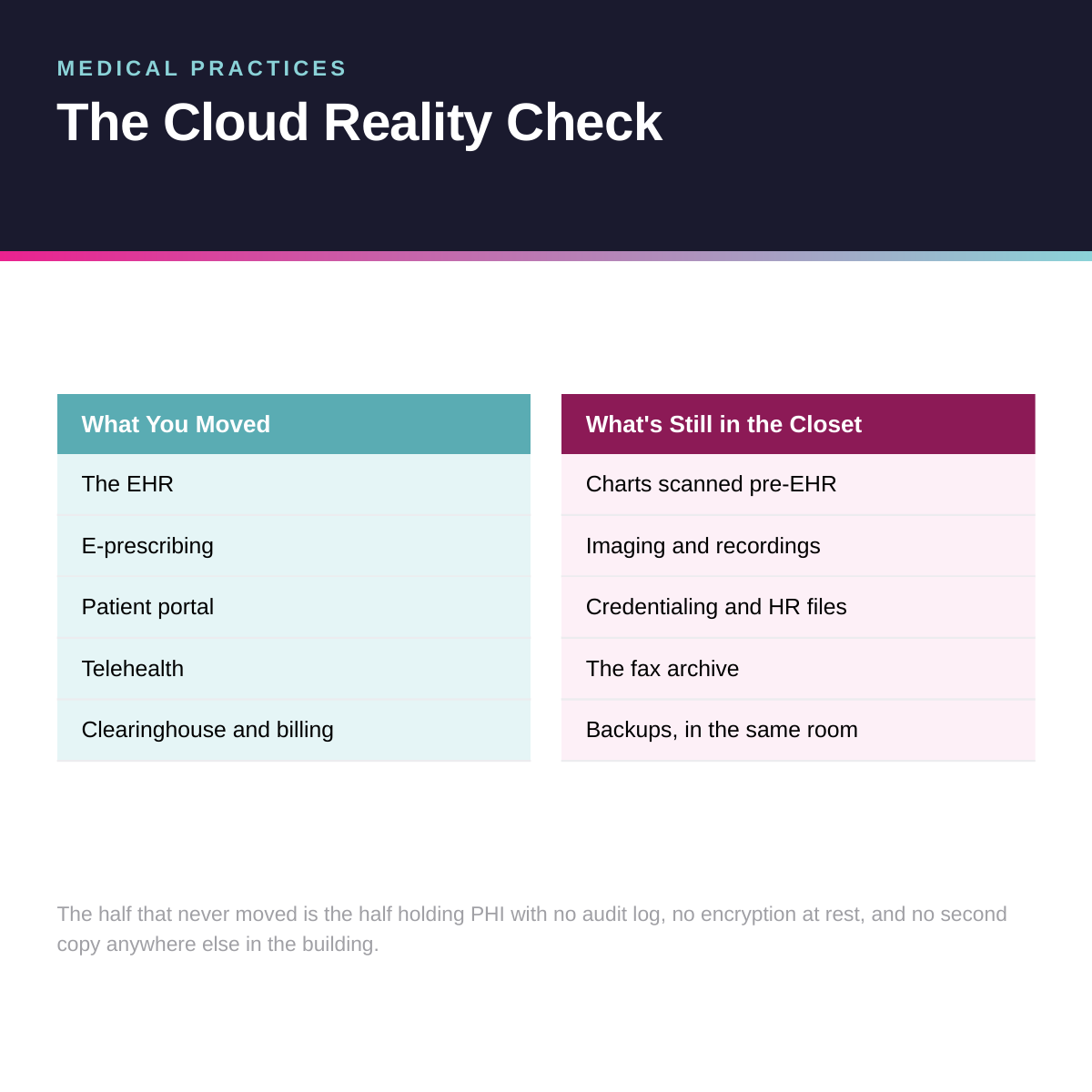
Most firms we assess believe they have already handled this. And they have handled part of it. Email moved to Microsoft 365 years ago. The case management platform is hosted now. E-filing was never local to begin with.
What did not move is the part nobody thinks about:
Notice the pattern. The half that moved is the half that had an obvious vendor pushing you to move it. The half that stayed is the half where somebody would have had to sit down and plan it. That is also, inconveniently, the half holding the privileged client material.
The Compliance Problem Nobody Brings Up
Here is the conversation that never happens: your IT provider tells you the server is fine, and technically they are right. It is running. Backups report success. Nothing is on fire. What does not get said is that you cannot prove any of it on paper.
What the Florida Bar Actually Says
The objection we hear most is that the bar will not allow client files in the cloud. That has not been true for over a decade.
Florida Bar Ethics Opinion 12-3, issued in 2013 and affirmed by the Board of Governors that July, permits lawyers to use cloud computing provided they take reasonable precautions: confirm the provider maintains adequate security, confirm you retain adequate access to your own data, and do actual due diligence on the provider. The ABA reaches the same place through Model Rule 1.1 and its technology competence comment.
The rules do not prohibit the cloud. They require diligence.And in practice, the server in the closet is usually the weaker position, because the diligence obligation runs both ways and you cannot document what you cannot measure.
The Questions You Cannot Answer Right Now
Every one of these is a reasonable question from a malpractice carrier, an auditor, or a sophisticated client. Try answering them about your current setup:
The Question
What a Server-Based Firm Usually Has to Say
Who opened the Smith file last month?
No access logging configured, and often no way to configure it
A paralegal resigned Friday. When was access revoked?
Manual, across several systems, and easy to miss one
Is client data encrypted at rest?
On a laptop, maybe. On the server, frequently not
When was your backup last restored and verified?
Nobody has tested it, so the honest answer is unknown
If the office floods, what is your recovery time?
The backup is in the same building as the server
For context on what is at stake: the average data breach in the legal sector runs $4.7 million (IBM, 2024), and under the Florida Information Protection Act a breach affecting 500 or more individuals must be reported to the Department of Legal Affairs. For a family law practice, 500 individuals is not a large number of files. Closing those gaps is the practical work behindsecurity posture and compliance documentation.
What Moving Actually Looks Like for a Firm
The real objection is rarely cost. It is disruption. Nobody wants to be the person who signed off on the project that took the document system down during trial prep.
Fair. So here is the actual shape of it. For a firm of 25 to 75 people, the work runs two to four weeks, and it is phased so that nothing critical moves all at once. This is the same sequence we use across ourcloud and Microsoft 365 services:
Phase
What Moves
What Your Team Notices
Weeks 1 to 2
Identity and files. Multi-factor enforced everywhere, shared drives migrated to SharePoint, offboarding process documented
Data copies in the background overnight. Everyone keeps working on the current system
Weeks 2 to 4
Backup and devices. Microsoft 365 backup configured, device management and encryption deployed
A short training session. A different drive letter on Monday
Next quarter
The line-of-business application, then the server gets retired
Scheduled deliberately, well clear of trial calendars and deadlines
The cutover happens on a weekend. The disruption people actually picture, the one where everything stops for a week, is the unplanned version: the server dies and you take whatever downtime the hardware lead time hands you.
The Licensing Money You Are Probably Leaving on the Table
While you are looking at this, look at what you are paying Microsoft. Two things changed on July 1, 2026 that most firms have not caught.
Prices went up. Business Standard moved from $15.00 to $16.80 per user per month on month-to-month pricing, and Business Basic went from $7.20 to $8.40. But Business Premium did not move. It held at $26.40. OurMicrosoft 365 licensing guidebreaks down every tier in detail.
That matters more than the increase itself.The gap between Standard and Premium shrank from $11.40 to $9.60 per user per month. Premium is the tier carrying device management, conditional access, and the access logging that answers the questions in the table above. For under ten dollars a month on the attorneys and paralegals who actually handle privileged material, that is now one of the cheapest compliance improvements available to a law firm.
The other half of this is that most firms license everyone identically, which is almost always wrong. Your partners, your paralegals, your receptionist, and your contract attorney who bills forty hours a quarter do not need the same license. We routinely find firms carrying 10 to 20 percent more licenses than they have people, and paying one tier too high on half the staff.
Worth asking your current provider directly: what are you charging me per Microsoft license versus what Microsoft charges, and do you reconcile my seat count when someone leaves? Four Winds passes vendor pricing straight through with no markup and reconciles seats monthly, which is part ofhow we price and what we do not mark up. A lot of providers charge a license fee, a platform base fee, and a per-seat management fee, which is three charges for one thing.
How to Find Out Where You Stand
None of this requires a consultant to diagnose. It requires twenty minutes and an honest inventory.
We built a twenty-one point checklist covering what is still running on your hardware, what happens if it fails, where your licensing money is going, and what a migration would actually cost. It ends with a one-page summary designed to be filled in and handed to whoever signs off, because the person who does the research is usually not the person who approves the budget.
Download theCloud Readiness Guide, run the inventory, and count your flags.If you want a second set of eyes on it, send it to us and we will return a findings summary with a cost estimate and a recommended sequence within 48 hours. No charge, no meeting required.
Frequently Asked Questions
Can a law firm ethically store client files in the cloud?
Yes. Florida Bar Ethics Opinion 12-3, affirmed by the Board of Governors in July 2013, permits lawyers to use cloud computing if they take reasonable precautions to protect client confidentiality, confirm the provider maintains adequate security, and ensure the firm retains adequate access to its own data. The ABA reaches the same conclusion through Model Rule 1.1 and its technology competence comment. The obligation is due diligence on the provider, not avoidance of the cloud. In practice a properly configured cloud environment produces the encryption and access logging evidence that an on-premise server usually cannot.
How long does a cloud migration take for a law firm?
For a firm of 25 to 75 people, expect two to four weeks. Identity and file storage move first, then backup and device management, with the line-of-business application typically scheduled for a following quarter. Data copies in the background overnight and on weekends while the team keeps working on the current system, and the cutover happens on a weekend. Most staff notice a short training session and a different path to their files.
Does moving to the cloud replace our document management system?
No. Cloud file storage and legal document management serve different purposes. Platforms like NetDocuments, iManage, or Clio handle matter organization, version control, and legal workflow. SharePoint and OneDrive handle underlying file storage and access. They work alongside each other. The goal is making sure both are reachable from court, home, or a client office without a VPN, and that permissions and audit logging are configured on both. For a look at what cloud file access looks like in practice, the same principles apply outside legal.
Do we still need a server if we move to the cloud?
In most cases, no. The usual exception is a line-of-business application with no cloud version, and that is worth verifying rather than assuming, because vendors have released hosted versions of software that firms still believe is desktop-only. If an application genuinely requires local infrastructure, it can often run on a cloud-hosted server instead, which removes the hardware from your building without changing how the software works.
How much does it cost to move a law firm off its server?
Migration cost depends on data volume, how many applications move, and how much permission cleanup is needed. The more useful comparison is against staying put: a five-year on-premise cycle runs roughly $14,300 to $35,000 for a firm of 25 to 75 people once hardware, server licensing, backup appliance, power, and maintenance are counted, before any downtime. Cloud shifts that from unpredictable capital hits to a predictable monthly number that scales with headcount. Sometimes the right answer is still to wait until your next refresh, and we will tell you when that is the case.
Not sure how much of your firm is actually in the cloud?
Dylan Borden is VP of Operations at Four Winds IT, a managed IT company headquartered in Sarasota, Florida. Four Winds serves 300+ businesses across Southwest Florida with a focus on transparent pricing and actually answering the phone.Connect with Dylan

 Dylan Borden : Apr 6, 2026, 8:30:00 AM