
Comparing Microsoft 365 Plans: Which One is Right for Your Business?
Compare Microsoft 365 plans with Four Winds IT. Discover features, pricing, & benefits for seamless collaboration & robust security tailored to you.
I’m going to tell you something most IT providers won’t: you’re probably paying for Microsoft 365 licenses you don’t need.
Not because you made a bad decision. Because someone sold you something they benefited from more than you did.
We manage Microsoft 365 for over 300 businesses across Florida. We’re a Microsoft Solutions Partner. We get free Copilot licenses as part of that partnership. And I’m about to walk you through exactly which licenses most small businesses actually need, and which ones are padding someone else’s margin.
A quick note on pricing: Microsoft 365 has three pricing tiers depending on your commitment level. Month-to-month (no commitment, cancel anytime) is the most flexible. Annual commitment paid monthly saves about 12%. Annual prepaid (pay the whole year upfront) saves a little more, but you give up the flexibility to pay as you go. We’ll lead with month-to-month pricing throughout this guide since that’s what most businesses start with, and we’ll show you where the annual savings make sense and where they can actually cost you more.
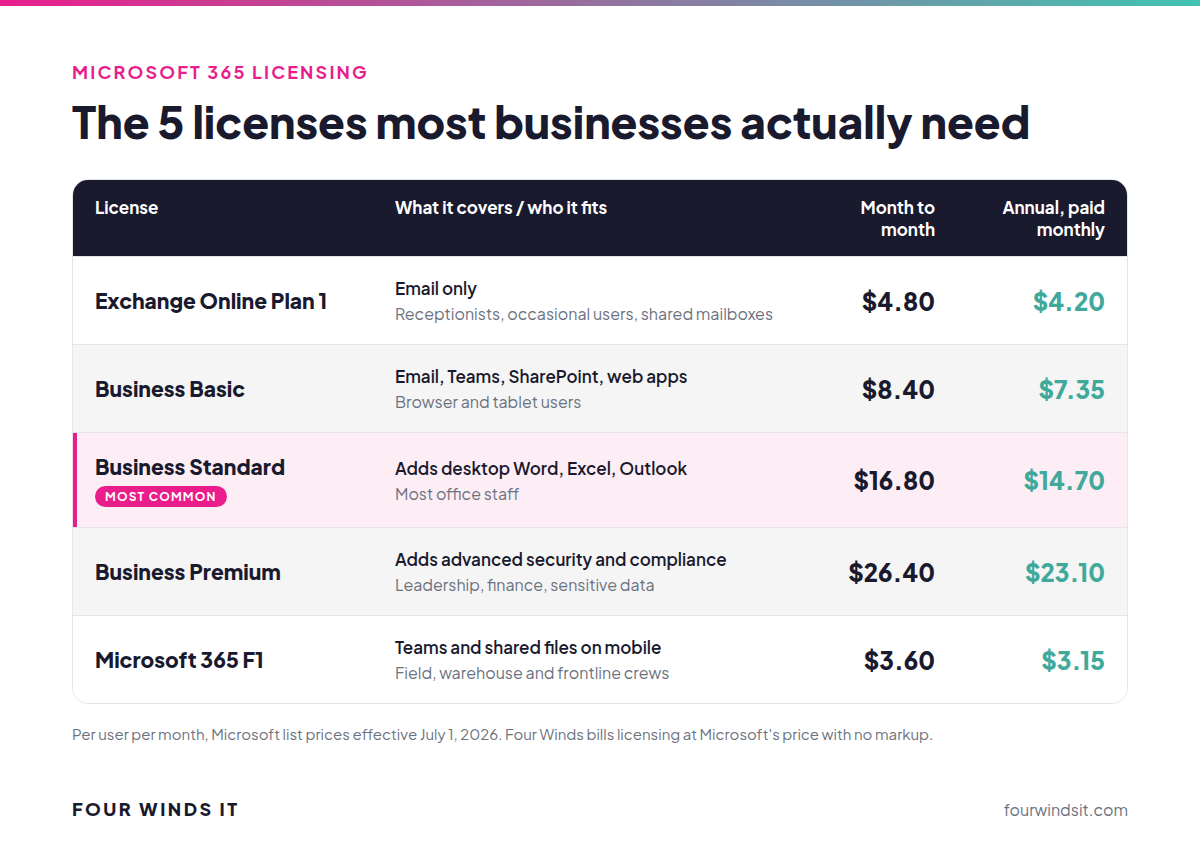
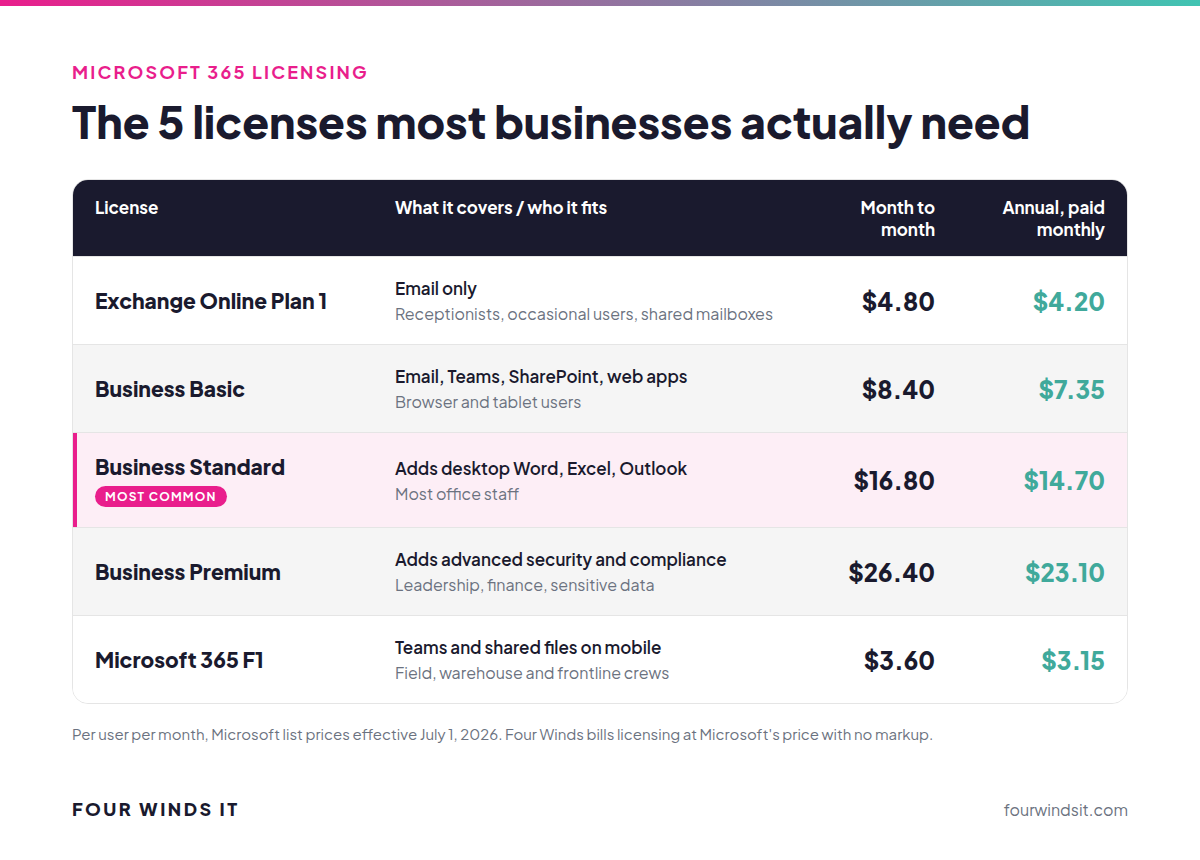
Microsoft sells over 20 different M365 license types. Most exist for enterprise scenarios that don’t apply to a 30-person law firm or a 50-person medical practice. Here are the five that matter:
You need this if: Someone just needs email. That’s it. No Teams, no Office apps, no SharePoint. Just a professional email address with a 50GB mailbox.
Think about it: the receptionist who only uses email. The semi-retired partner who checks messages twice a week. The shared mailbox for info@ or billing@. Why would you pay $16.80 for a full license when $4.80 covers what they actually use?
Annual commitment: $4.20/mo (paid monthly)
You need this if: Someone needs email, Teams, and SharePoint but lives in their browser and doesn’t need desktop Word, Excel, or Outlook installed on their computer.
This is the right fit for field workers who use a tablet, staff who primarily work in a web browser, or teams already using other tools for document creation. It includes the web versions of all Office apps - they’re just not installed locally.
Annual commitment: $7.35/mo (paid monthly)
You need this if: You’re a normal office worker at a normal business. This is the one.
Desktop Word, Excel, PowerPoint, and Outlook. Email. Teams. SharePoint. OneDrive. This is the workhorse license that fits 80% of the people at most businesses we work with. If you’re not sure what someone needs, it’s probably this.
Annual commitment: $14.70/mo (paid monthly)
You need this if: Your company wants real security baked into the platform - not bolted on after the fact.
Premium adds Conditional Access (controlling who can log in from where), Azure Information Protection (controlling who can see what), and compliance features like eDiscovery and data loss prevention. It’s also the license that makes your cyber insurance application a lot easier to fill out. If you’re a healthcare practice dealing with HIPAA, a law firm protecting client files, or any business that takes data security seriously - this is where you should land for leadership and staff handling sensitive data.
Annual commitment: $23.10/mo (paid monthly)
You need this if: You have frontline workers who need to communicate with the team but don’t need a full email setup or desktop apps.
HVAC techs, warehouse crews, service teams in the field, retail staff. They need Teams on their phone, access to shared documents, and maybe a shift schedule. They don’t need a 50GB mailbox and a desktop copy of Excel. At $3.60/month, this is dramatically cheaper than giving everyone a Standard license.
Annual commitment: $3.15/mo (paid monthly)
Not sure which license a specific person needs? Use this: .png?width=862&height=542&name=image%20(6).png)
Here’s my honest take: if you have fewer than 300 employees, you almost certainly don’t need Enterprise licensing.
The Business licenses (Basic, Standard, Premium) cap at 300 users. Enterprise licenses (E1, E3, E5) exist primarily for organizations that exceed that cap or have very specific compliance and security requirements that go beyond what Premium offers.
If your IT provider has you on E3 licensing and you have 40 employees, ask them why. The answer might be legitimate, maybe you need specific compliance features. But it also might be that E3 costs more per user and nobody bothered to check whether Business Premium would cover the same ground for less money. Spoiler: for most businesses under 300 users, it does.

Check your license mix before your next renewal.
Everyone asks about Microsoft 365 Copilot, and here’s where I’m going to be unusually honest.
Copilot is a paid add-on, $22.05/user/month for Copilot Business (300 users or fewer) or $31.50/user/month for Microsoft 365 Copilot on an annual term paid monthly, that puts AI into Word, Excel, PowerPoint, Outlook, and Teams. It can summarize meetings, draft emails, analyze spreadsheets, and generate documents. On paper, it sounds incredible.
In practice? We have mixed feelings.
We’re a Microsoft Solutions Partner. We get free Copilot licenses. Our team has tested it extensively. And honestly, we’ve found better results with other AI platforms. Claude and ChatGPT have been more capable and more flexible for the way we actually work.
That’s not to say Copilot is bad. For certain use cases, meeting summaries in Teams, email drafting in Outlook - it’s genuinely useful. But at $22 to $31.50 per user per month, it’s a significant investment, and we don’t think it’s the best AI option for most businesses right now.
Look at AI aggregator platforms like HATZ that give you access to the best models from multiple providers instead of locking you into a single vendor. The AI landscape is changing fast, what’s best today might not be best in six months. An aggregator approach gives you options, and options are always better than lock-in.
If a provider is pushing Copilot as the only AI solution, ask yourself whether they’re recommending it because it’s the best tool for you, or because it’s another $22 to $31.50 per user on your bill.
This is the part most providers won’t explain because it doesn’t benefit them.
Microsoft offers three pricing tiers based on commitment level:
On the surface, an annual term looks like the obvious winner, you’re saving about 12% compared to M2M. But here’s the catch: annual licenses can’t be canceled mid-term. You can add licenses anytime, but you can’t reduce until the anniversary date.
In practice, this means businesses end up floating empty licenses. Someone quits in March. Their annual license doesn’t expire until November. You’re paying for a seat nobody’s sitting in.
We’ve seen companies paying for 15-20% more licenses than they actually use at any given time. That 12% “savings” on annual commitment? It evaporates when you’re carrying dead weight.
Put 80% of your stable, long-term staff on annual commitment. Keep 20% of your licenses on month-to-month for flexibility, new hires, seasonal workers, roles with turnover. You get most of the annual savings on your core team while maintaining the ability to scale up and down without waste.
Most providers default everyone to annual because it’s simpler for them and locks you in. We default to the mix that actually saves you money.
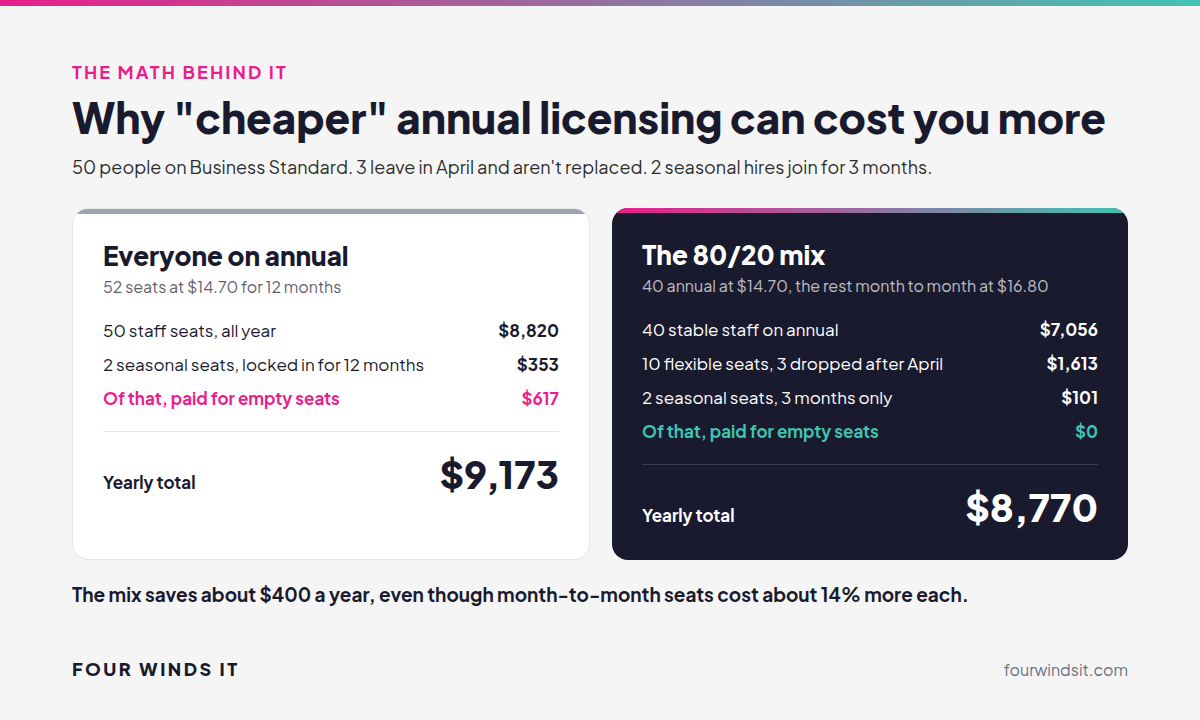
Take a 50-person company on Business Standard where 3 people leave in April without being replaced and 2 seasonal hires join for 3 months. Putting everyone on annual costs about $9,173 a year, including $617 for seats nobody is using. The 80/20 mix comes out about $400 ahead at $8,770, even though those M2M licenses cost about 14% more individually. The savings come from not paying for seats that sit empty.
Here’s something you should know about how most IT providers handle Microsoft licensing: they mark it up.
Some add $1-5 per user per month on top. That might not sound like much, but on a percentage basis, that’s an 8-40% markup depending on the license. And on a 50-person company, even a $3/user markup adds up to $1,800/year you’ll never see on your invoice if billing is bundled.
We don’t do any of that. We bill Microsoft licensing at the same price Microsoft charges based on your commitment level and payment frequency. Dollar for dollar. No markup, no margin, no hidden fee.
.png?width=1200&height=520&name=image%20(3).png)
Why? Because we’d rather be transparent about licensing and earn your business on the service side. If you trust us with your licensing, you’ll trust us with your support, your security, and your strategy. That’s where we add value, not by skimming a few dollars off every license.
And here’s a bonus you get by going through a Microsoft partner instead of buying direct: when something goes wrong, you get our support team AND our direct line to Microsoft’s partner support channel. Anyone who’s tried to call Microsoft support directly knows that’s worth the price of admission by itself.
Before you go, here’s a quick gut check: .png?width=1200&height=640&name=image%20(5).png)
If any of those hit home, it’s worth a conversation. Not a sales pitch, just a look at your current licensing to see if there’s a better fit.
Microsoft raised prices on most Business and Enterprise plans effective July 1, 2026. If your annual term renewed after that date, you're already paying the new rates. If it renews soon, this is what you'll see:
| License | Month to month | Annual term, paid monthly | Change |
|---|---|---|---|
| Business Basic | $8.40/user/mo | $7.35/user/mo | Up about 17% |
| Business Standard | $16.80/user/mo | $14.70/user/mo | Up about 12% |
| Business Premium | $26.40/user/mo | $23.10/user/mo | No change |
| Microsoft 365 F1 | $3.60/user/mo | $3.15/user/mo | Up about 33% |
Microsoft paired the increase with added security, management and Copilot Chat capabilities in its plans. Advanced email protection (Microsoft Defender for Office 365 Plan 1) is still included only in Business Premium among the Business plans, which is one more reason to match licenses to roles.
What this means for you: the increase makes the licensing mix matter more. Fifty Business Standard licenses you don't need now cost $8,820 a year on an annual term paid monthly. If your renewal is coming up, it's the right time to right-size before you lock in another 12 months. We can help with that.
We put together a one-page guide that breaks down the five licenses you actually need, when to use each one, and the red flags that suggest you might be on the wrong plan. No jargon, no fluff - just the information you need to make sure you’re not overpaying.
Download the M365 Licensing Guide →
Microsoft 365 for business ranges from $3.60 to $26.40 per user per month on month-to-month pricing (no commitment). An annual commitment paid monthly saves about 12%. Most office workers land on Business Standard at $16.80/month M2M or $14.70/month on an annual term paid monthly. Frontline workers can use F1 at $3.60 M2M, and security-focused roles may need Business Premium at $26.40 M2M. The right approach is mixing license types to match actual roles rather than putting everyone on the same plan.
Business licenses (Basic, Standard, Premium) are designed for organizations with up to 300 users. Enterprise licenses (E1, E3, E5) remove that cap and add advanced compliance and analytics tools. For most businesses under 300 employees, Business Premium provides equivalent security and compliance features at a lower per-user cost than E3.
Yes, and you should. A typical business might have 60-80% of staff on Business Standard, 10-20% on Business Premium (leadership, finance, anyone handling sensitive data), and the remainder on Exchange Plan 1, Business Basic, or F1 depending on their role. Mixing licenses to match actual usage is one of the simplest ways to reduce your M365 spend.
We recommend an 80/20 mix: annual commitment for 80% of your stable workforce (saving about 12% per license versus M2M) and month-to-month for the remaining 20% to cover new hires, seasonal staff, and roles with turnover. This approach captures most of the annual discount while eliminating the cost of empty seats you can’t cancel mid-term. If you go annual, paying the year upfront saves a little more than monthly billing, but ties up the cash.
At $22.05 to $31.50 per user per month on an annual term paid monthly, Copilot is a significant investment. It works well for specific use cases like Teams meeting summaries and Outlook email drafting. However, standalone AI platforms like Claude and ChatGPT currently offer broader capabilities at lower cost for most business tasks. We recommend starting with an AI aggregator approach rather than a company-wide Copilot rollout - and scaling based on actual usage and results.
Yes. Microsoft raised prices effective July 1, 2026. On month-to-month pricing, Business Basic is now $8.40, Business Standard $16.80 and F1 $3.60 per user per month. Business Premium stayed flat at $26.40. On an annual term paid monthly, those are $7.35, $14.70, $3.15 and $23.10. Existing annual terms move to the new price at renewal, so right-sizing your licenses before you renew is the best way to limit the impact.

Dylan Borden - runs operations at Four Winds IT, a managed IT company headquartered in Sarasota, Florida. Four Winds serves 300+ businesses across Southwest Florida with a focus on transparent pricing and actually answering the phone.

Compare Microsoft 365 plans with Four Winds IT. Discover features, pricing, & benefits for seamless collaboration & robust security tailored to you.
 Dylan Borden : Sep 25, 2026, 2:01:16 PM
Free Copilot Chat vs. paid Copilot, Copilot Business vs. Microsoft 365 Copilot, real month-to-month pricing, and how Copilot follows your permissions.

Enhance your SMB's productivity and security with Microsoft 365 Business Premium. Learn how Four Winds IT can help transform your business operations.
