
Comparing Microsoft 365 Plans: Which One is Right for Your Business?
Compare Microsoft 365 plans with Four Winds IT. Discover features, pricing, & benefits for seamless collaboration & robust security tailored to you.
Microsoft Copilot is Microsoft's AI assistant for work. Every Microsoft 365 business plan already includes the free version, Copilot Chat. The paid license adds Copilot inside Outlook, Teams, Word and Excel, plus the ability to search and use your company's email, files, chats and meetings, limited to what each person already has permission to see. For a 20 to 75 person business, the paid version can give back real hours each week. But only if you clean up who can see what first and train people on their actual work.
Here's the real question most businesses skip: not "should we use AI," but "is our Microsoft 365 ready for AI to read everything each person can open?" This guide covers the two versions, the two paid licenses, what they really cost, and how to roll Copilot out without surprises. Every price and licensing detail below comes from Microsoft's own pricing pages and documentation, linked in the Sources section at the end.
Key takeaways
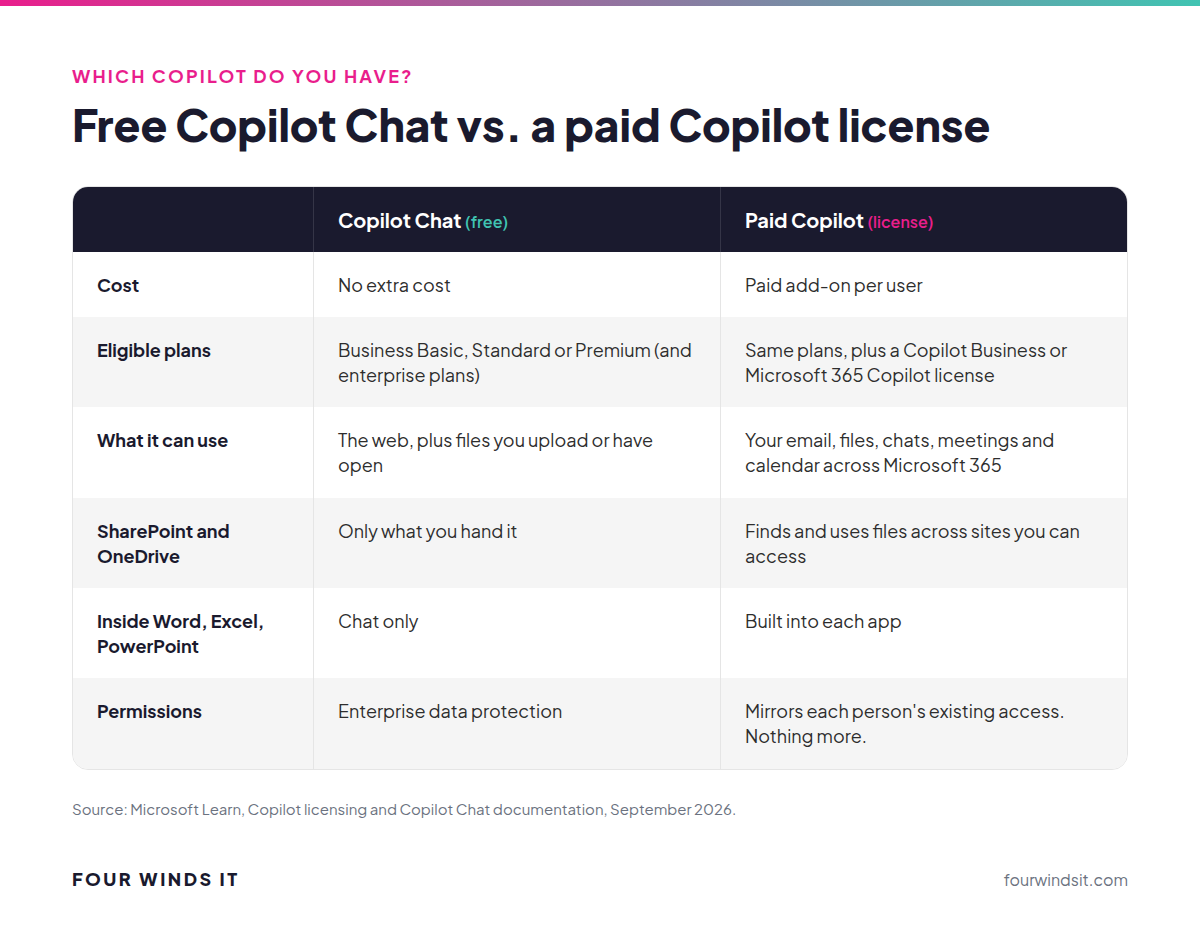
"Copilot" is Microsoft's name for several products, and Microsoft keeps renaming them (Microsoft 365 Copilot is now officially just "Microsoft Copilot," and Microsoft 365 Copilot Chat is now "Microsoft Copilot Chat"). For a business, it comes down to free versus paid.
If your team is only using the free version, that's a fine way to build AI habits at no cost. The paid version is where the time savings show up, because it works across your actual business content.
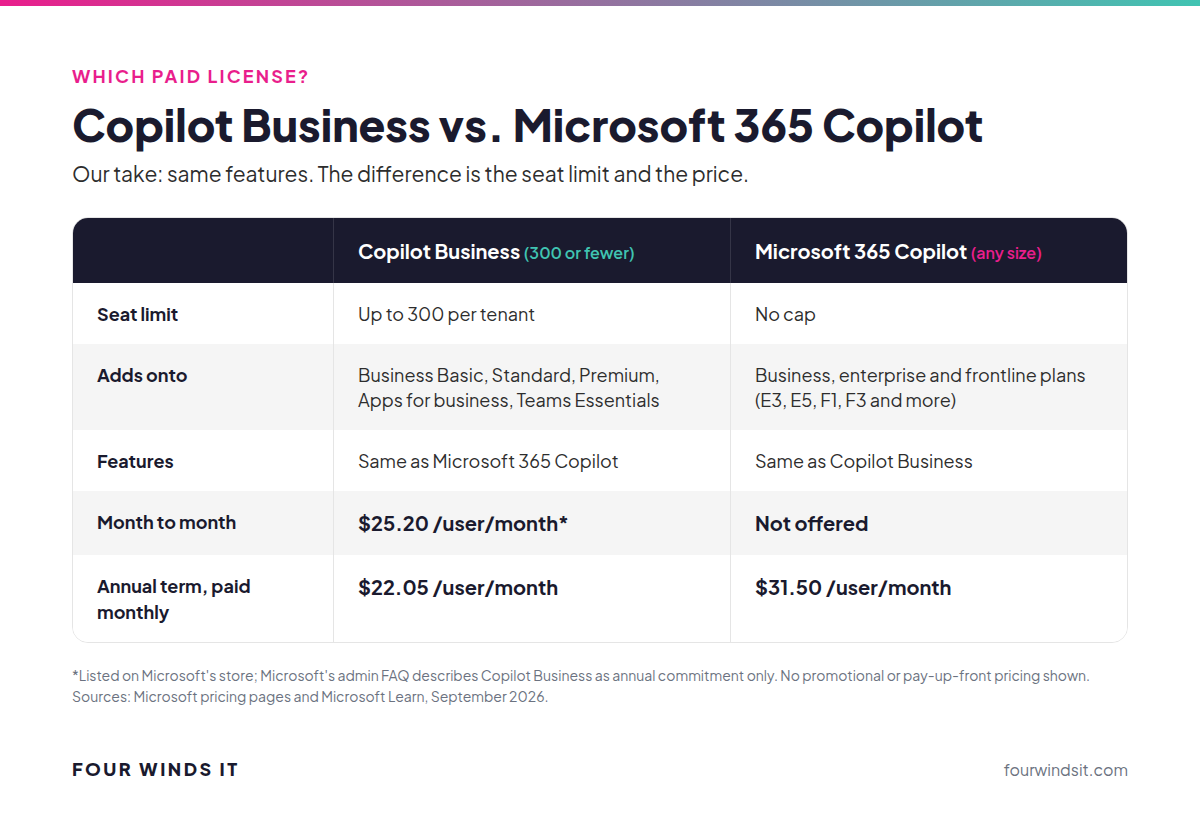
There are two paid licenses, and Microsoft's marketing makes them sound more different than they are.
| Copilot Business | Microsoft 365 Copilot | |
|---|---|---|
| Who it's for | Businesses with 300 or fewer users | Any size, including over 300 users |
| Seat limit | Up to 300 per tenant | No cap |
| Plans it adds onto | Microsoft 365 Business Basic, Standard or Premium, Apps for business, Teams Essentials | Business plans plus enterprise and frontline plans (E3, E5, F1, F3, Office 365 E1/E3/E5 and more) |
| Features | Same capabilities as Microsoft 365 Copilot | Same capabilities as Copilot Business |
| Month to month | $25.20/user/month* | Not offered on Microsoft's pricing page |
| Annual term, paid monthly | $22.05/user/month | $31.50/user/month |
*Microsoft's online store lists a $25.20 monthly subscription, but Microsoft's Copilot Business admin FAQ says the plan is annual commitment only. Confirm the term before you count on canceling month to month. Prices as of September 2026, before tax, with no promotions applied.
Our frank take: the only real differences are the 300-user limit and the price. Microsoft says Copilot Business "delivers the same capabilities" as Microsoft 365 Copilot. If you have 300 or fewer people on a Microsoft 365 Business plan, Copilot Business is the obvious pick. If you're over 300, or on enterprise plans like E3 or E5, Microsoft 365 Copilot is your option.
One catch worth knowing: if you already bought Microsoft 365 Copilot, Microsoft won't convert those seats to Copilot Business at renewal. You finish your current commitment first, then switch.
This is the part most owners get wrong, in both directions. Copilot doesn't have its own access to your files. It works as the person using it.
Microsoft's documentation is direct about it: Copilot "only surfaces organizational data to which individual users have at least view permissions," and it only accesses data a user is authorized to see "based on, for example, existing Microsoft 365 role-based access controls." If a paralegal can't open the partner compensation folder, Copilot can't read it for them. If a file is protected with a sensitivity label or encryption, Copilot honors the usage rights that person was granted.
That's the good news. It's also the risk. Copilot shows each person anything they already have access to, and in most businesses we look at, people can open far more than they should: an "Everyone" SharePoint site with HR files in it, a Teams channel nobody cleaned up after a project, a OneDrive link to payroll exports shared with the whole company. Nobody went looking before. With Copilot, anyone can ask "what are people paid here?" and get an answer from a file they technically had access to all along.
So role-based access isn't a nice-to-have anymore. Before rollout:
Microsoft also states that prompts, responses and data accessed through Microsoft Graph are not used to train its foundation AI models.
Skip the demo-video version. Here's what the paid license does day to day, app by app:
| App | What Copilot does | Where it saves time |
|---|---|---|
| Outlook | Summarizes long threads, drafts replies from a few bullet points, flags what needs a response | Catching up after a day out, client follow-ups |
| Teams | Recaps meetings, lists decisions and action items, answers "what did I miss?" | No more writing meeting notes by hand |
| Word | Builds first drafts from your existing files, rewrites and shortens, summarizes long documents | Proposals, policies, engagement letters, reports |
| Excel | Explains trends, suggests formulas, builds charts from plain-English questions | Monthly numbers, job costing, pipeline reviews |
| PowerPoint | Turns a Word document or outline into a first-draft deck | Board updates, client presentations |
| SharePoint and OneDrive | Finds and summarizes documents across sites you can access, without you knowing where they're saved | "Where's the latest version of our employee handbook?" |
The pattern: Copilot is best at the first 70 percent of a task. It gets you a draft, a summary or an answer fast. A person still reviews and finishes it.
What most businesses don't realize is that the payoff depends far more on how your people work than on the software. The biggest wins go to people who spend their day in email, meetings and documents. A few examples from the industries we support:
Microsoft's own research on early users found that 70 percent said Copilot made them more productive (Microsoft Work Trend Index). Treat vendor numbers as a ceiling, not a promise. Your results depend on adoption.
The dirty secret of Microsoft pricing: the number on the front of the website is almost always the cheapest version. It usually assumes you pay a full year up front, and it often includes a promotion with an end date. We don't quote those numbers, because we don't want you budgeting around a price you won't actually pay.
Here's what the paid licenses cost the two ways most of our clients buy them:
You'll also see Microsoft advertise a lower Copilot Business price through December 31, 2026. That's a promotion on an annual, pay-up-front term. It ends, and it doesn't reflect what you'll pay at renewal. Microsoft also now sells Business Standard and Business Premium with Copilot bundled in. Depending on your plan, a bundle can cost less than buying the two separately, so it's worth pricing both ways.
The license isn't the whole cost. Budget for:
| Plan | Month to month | Annual term, paid monthly |
|---|---|---|
| Business Basic | $8.40/user/month | $7.35/user/month |
| Business Standard | $16.80/user/month | $14.70/user/month |
| Business Premium | $26.40/user/month | $23.10/user/month |
Here's the math most owners use: if a Copilot seat saves someone paid $35 an hour just one hour a month, it has paid for itself. The question is whether your people will actually use it, which is why a pilot comes first.
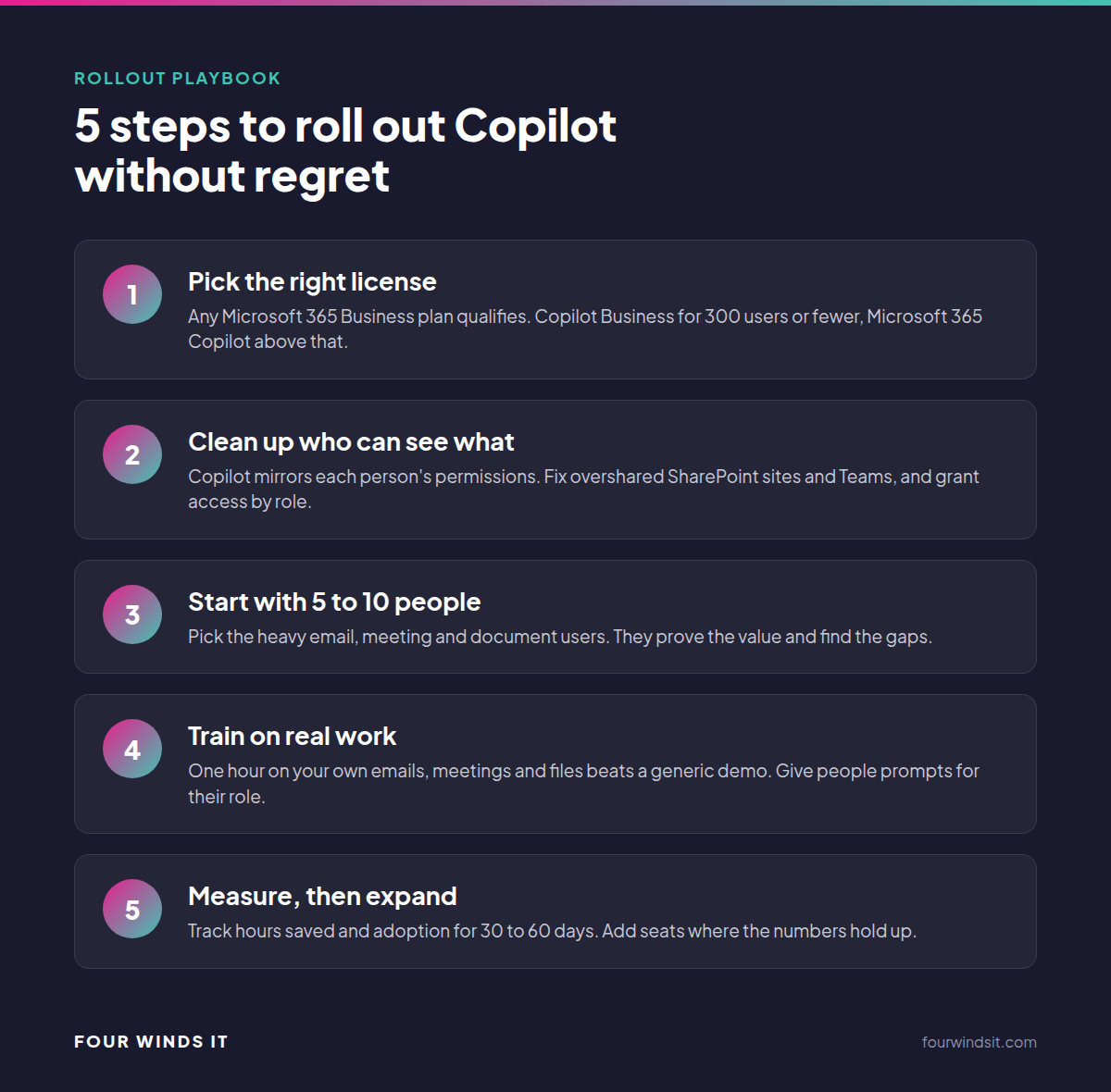
Keep it simple. Track three things during the pilot:
If a seat isn't saving at least an hour a month, reassign it. Copilot licenses can move between people.
Copilot Chat is included at no extra cost with Microsoft 365 Business Basic, Business Standard and Business Premium, as well as enterprise plans. It's grounded in the web and whatever content you give it. The paid license, which works inside Outlook, Teams, Word and Excel and uses your company data across SharePoint and OneDrive, costs $25.20 per user per month month to month for Copilot Business, or $22.05 per user per month on an annual term paid monthly.
No. Copilot Business can be added to Microsoft 365 Business Basic, Business Standard, Business Premium, Apps for business and Teams Essentials. Premium adds more security controls, which help, but it isn't a requirement.
The seat limit and the price. Copilot Business supports up to 300 users per tenant and costs less. Microsoft 365 Copilot has no user cap and costs $31.50 per user per month on an annual term paid monthly. Microsoft says the features are the same.
Copilot only shows people what they already have permission to open, based on your existing Microsoft 365 permissions and role-based access. The problem is that most businesses have overshared files nobody noticed. Cleaning up permissions before rollout is the most important step.
Microsoft states that prompts, responses and data accessed through Microsoft Graph are not used to train its foundation AI models, and that Copilot interactions are stored in line with your organization's other Microsoft 365 content.
For a 20 to 75 person business, plan on two to four weeks to review licenses and clean up permissions, then a 30 to 60 day pilot with a small group before expanding.
We get it. AI moves fast and nobody wants to be the business that's behind, or the one that exposed payroll to the whole company. Four Winds IT helps businesses across Florida pick the right license, clean up permissions, run a pilot and train their teams, with local engineers who know your environment.
Learn more about our AI implementation services and our secure AI platform, or talk to our team about a Copilot readiness check.
All pricing and licensing details are from Microsoft, checked September 2026.

Compare Microsoft 365 plans with Four Winds IT. Discover features, pricing, & benefits for seamless collaboration & robust security tailored to you.

 Dylan Borden : Oct 17, 2025, 11:09:00 AM
Cybersecurity lessons from October's Awareness Month: MFA, email security, & 24/7 monitoring to protect your business year-round. Practical steps...
 Dylan Borden : Sep 15, 2026, 4:41:39 PM
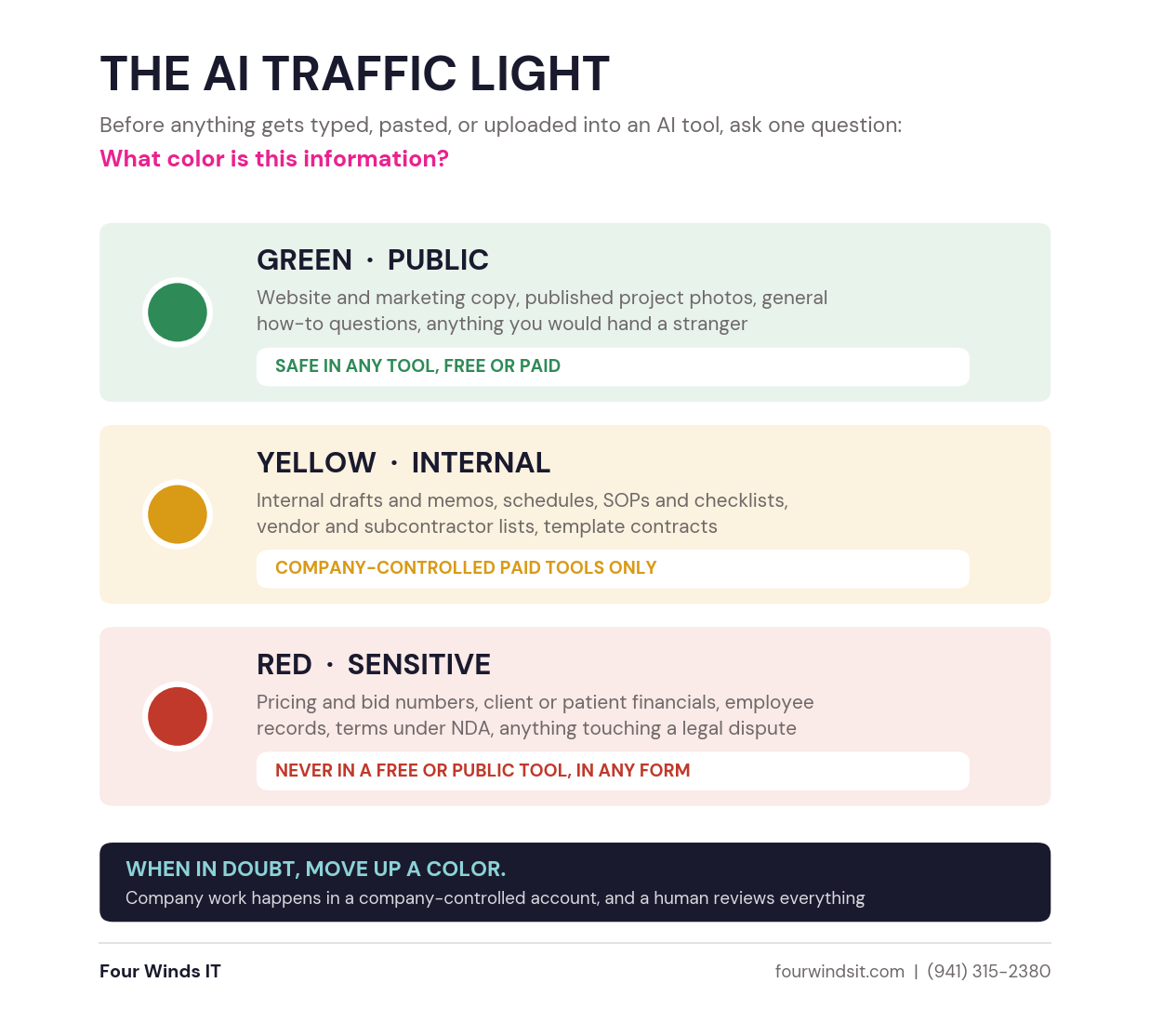
Your staff is already using AI, likely on personal accounts. Three rules that keep it from costing you: the account type, the traffic light, and...
