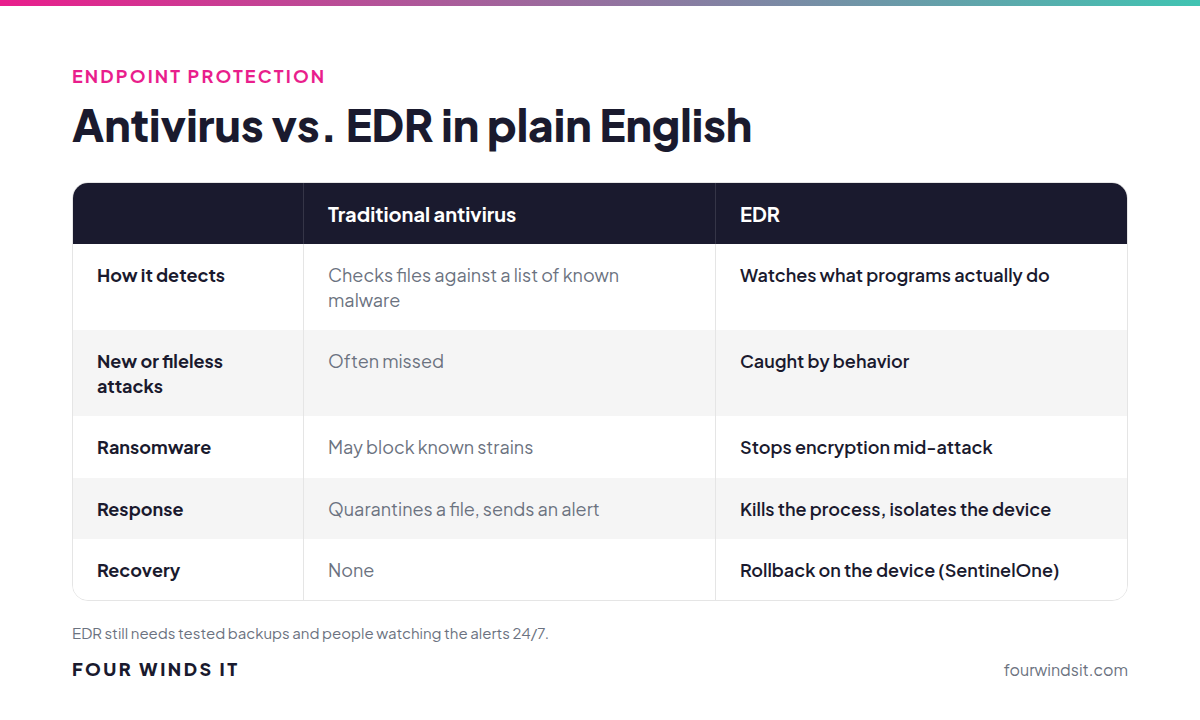
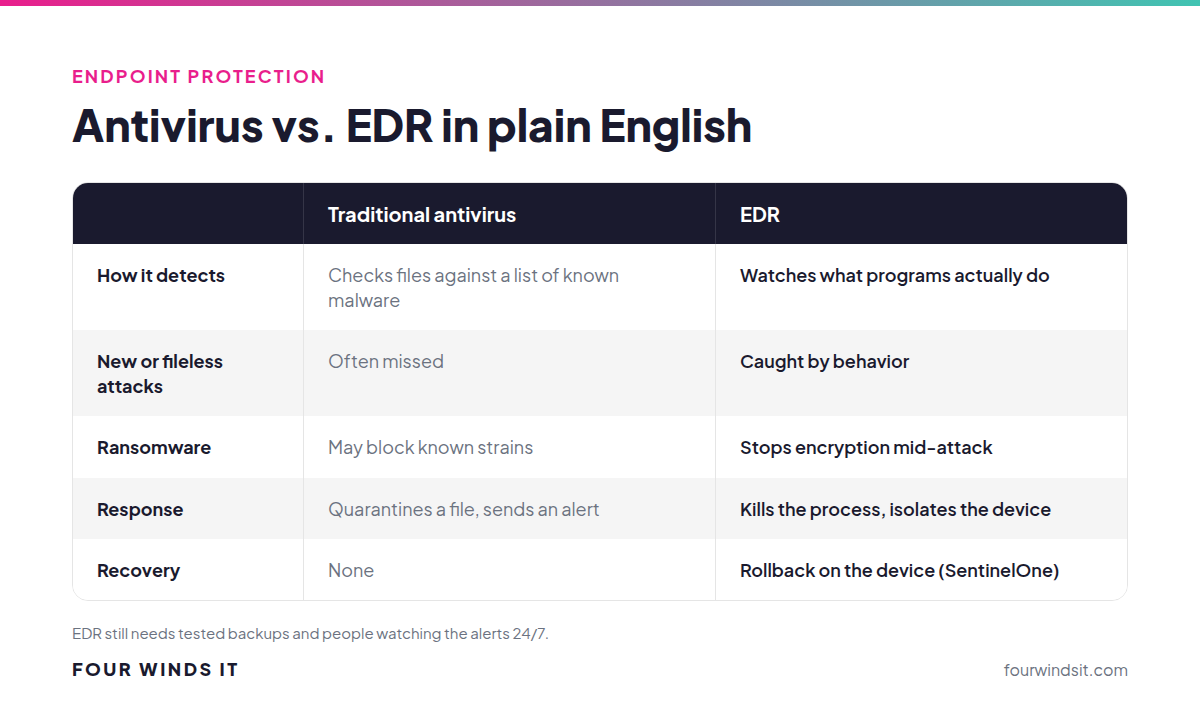
For most businesses, basic antivirus is no longer enough on its own. Traditional antivirus looks for known bad files, and modern attacks often don't use any. Endpoint detection and response (EDR) watches what programs actually do, stops suspicious behavior like mass file encryption as it happens, and can roll affected files back. It's what we recommend for every business computer.
Traditional IT support would tell you "you've got antivirus, you're covered." Then ransomware gets in through a stolen password and a built-in Windows tool, the antivirus never flags a file, and Monday morning every shared folder is encrypted. We've seen that story enough times to skip the theory and explain what actually protects a laptop in plain English.
Key takeaways
- Antivirus asks "is this file on the bad list?" EDR asks "is this program behaving like an attack?"
- Microsoft's own security guidance says signature-based antivirus "misses modern threats that use fileless techniques."
- EDR can stop ransomware mid-attack, isolate the device and, with SentinelOne, roll affected files back.
- EDR is software. Pair it with people watching the alerts 24/7 (MDR) and tested backups.
What does antivirus actually do?
Classic antivirus works like a bouncer with a list of known troublemakers. It checks each file against a list of known malware "signatures" and blocks matches. That still catches plenty of common junk, and Windows includes Microsoft Defender Antivirus as a solid baseline.
The problem is everything that isn't on the list: brand-new malware, malware that changes itself to avoid matching, and attacks that don't use a malicious file at all. Microsoft's security benchmark puts it plainly: "Traditional antivirus signature detection misses modern threats that use fileless techniques, living-off-the-land binaries, and sophisticated obfuscation."
What does EDR do differently?
EDR watches behavior instead of just files. It doesn't matter whether a program is on a list. What matters is what it's doing: suddenly encrypting hundreds of files, dumping saved passwords from memory, turning off security settings or reaching out to a known attacker server. When it sees that, it acts.
- Detect: behavioral analysis spots attacks that have no known signature.
- Stop: it kills the malicious process and can isolate the device from the network.
- Investigate: it records what happened, so you know how the attacker got in and what they touched.
- Recover: some EDR tools can undo the damage on the device.
Why we use SentinelOne
We deploy SentinelOne on our clients' computers because it does the parts that matter most for a small business, without depending on someone being online:
- Behavioral AI on the device. SentinelOne says its "On-agent Behavioral AI identifies and stops fileless attacks" in real time.
- Protection without the internet. It's built for "autonomous operation" with "no cloud reliance," so a laptop on hotel Wi-Fi or offline is still protected.
- Rollback. SentinelOne says its "One-Click remediation & rollback reverses unauthorized changes and data affected by an attack," which can restore files ransomware encrypted on that device.
Even SentinelOne says rollback isn't a backup. It has storage limits, and it recommends you "still keep regular external backups." That's why we always pair EDR with tested backups. See cloud storage vs. cloud backup for how we handle that side.
EDR vs. MDR: what's the difference?
EDR is the software on each device. MDR (managed detection and response) is the team watching what that software finds, 24/7, and acting on it. EDR handles a lot automatically, but some alerts need a human to decide whether a login or a tool is legitimate, and that decision can't wait until Monday. We pair SentinelOne with Blackpoint's 24/7 security operations center. Read what MDR actually does.
Is Microsoft Defender good enough?
Microsoft Defender Antivirus, built into Windows, is a good baseline and far better than nothing. It isn't the same as a managed EDR platform with rollback, central visibility across every device and a team watching the alerts. For a business handling client data, the question isn't which logo is on the box. It's whether suspicious behavior gets stopped, investigated and cleaned up, at any hour.
Endpoint protection is part of the "Secured" foundation of our cybersecurity framework, alongside a business-grade firewall, MFA, email security and offsite backup. See how our endpoint security works, or take our cybersecurity tier quiz.
Frequently asked questions
Is antivirus enough for a small business?
For most businesses, no. Traditional antivirus catches known malware but misses attacks that don't use a known malicious file. EDR adds behavior-based detection, automatic response and investigation, which is what stops modern ransomware.
What is EDR?
Endpoint detection and response is security software on each computer that watches how programs behave, stops suspicious activity like mass file encryption, isolates infected devices and records what happened so it can be investigated and cleaned up.
Can EDR stop ransomware?
Good EDR can detect ransomware behavior and stop it mid-attack, often before much damage is done. SentinelOne can also roll back files encrypted on the device. It still isn't a substitute for tested offsite backups.
What's the difference between EDR and MDR?
EDR is the software on each device. MDR is a team of security analysts who watch EDR alerts around the clock and take action, such as isolating a device at 2 a.m., so threats don't wait for business hours.
How much does EDR cost?
EDR is priced per device per month, and you can add it to your Four Winds IT agreement on its own. We group it in our "Secured" foundation tier because we consider it a baseline for every business, but every security layer we offer is chosen individually.
Do we still need antivirus if we have EDR?
Modern EDR platforms like SentinelOne include antivirus-style protection, so you don't need a separate antivirus product on top. You replace legacy antivirus rather than stacking both.
Not sure what's protecting your computers today?
We get it. "We have antivirus" is what most people were told was enough. We'll check what's actually running on every device, close the gaps and pair it with 24/7 monitoring, with local engineers in Sarasota who answer the phone. Talk to our team.
Sources

 Dylan Borden : Oct 7, 2024, 12:45:00 PM