If you run your business on QuickBooks Online, there’s one question you should be able to answer in a sentence: who’s actually backing up your books?
Most owners can’t. The ones who try usually say something like “Intuit, they run the platform.” That answer feels right. It’s also wrong, and it’s the reason this article exists.
What Intuit Actually Says
Here’s the line from Intuit’s own Terms of Service:
“You are responsible for any lost or unrecoverable Content. Intuit is not responsible for any of your content that you submit through the Services.”
Intuit Terms of Service · Section 6.1.1
That’s not buried in legalese. That’s the policy, stated plainly. Intuit protects the QuickBooks platform. If their data center has a problem, they restore the platform. They are not on the hook for your specific data.
Most business owners read that sentence twice. The second read is when it sinks in.
What’s Actually at Stake
Open up your QuickBooks file in your head for a second. What’s in there?
Every invoice you’ve sent. Every bill you’ve paid. Your chart of accounts. Customer and vendor records. Payroll history. Journal entries. Years of financial activity that your accountant, your lender, the IRS, and your future buyer all rely on.
Now imagine you walk in tomorrow and a chunk of that is gone. Not because Intuit’s servers crashed. Because something happened on your side that Intuit’s backup doesn’t cover.
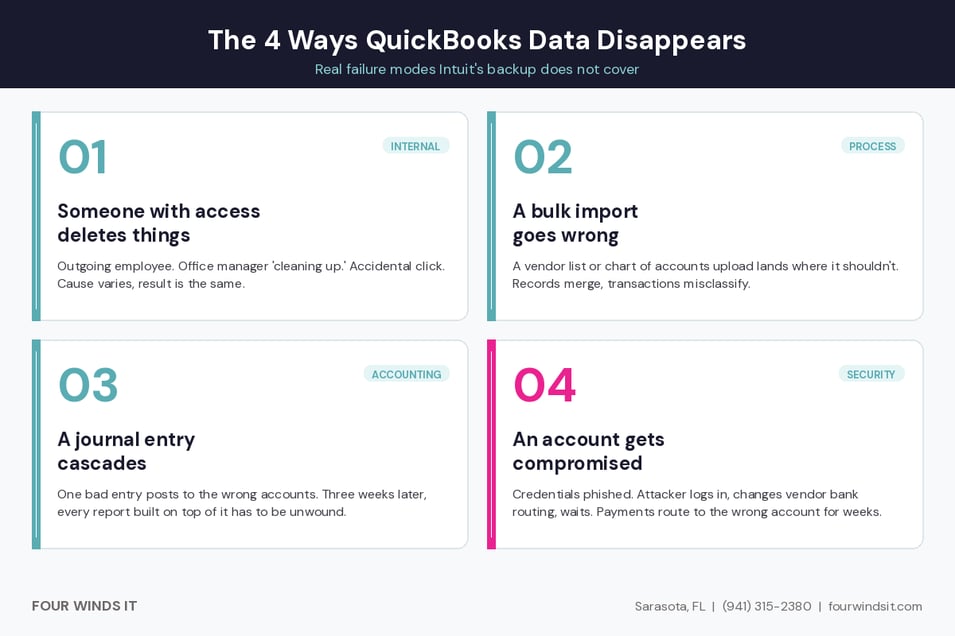
The Four Ways QuickBooks Data Disappears
In our experience, this is how it usually plays out.
1. Someone with access deletes things.Could be malicious. Could be accidental. Could be an outgoing employee on bad terms. Could be the office manager trying to “clean up” before quarter-end. The cause varies. The result is the same.
2. A bulk import goes wrong.Someone uploads a corrected vendor list or a restructured chart of accounts from a spreadsheet. The import doesn’t land where they think it does. Now vendor records are merged, transactions are misclassified, and the only path back is manual.
3. A journal entry cascades.One bad entry posts to the wrong accounts. Someone catches it three weeks later. By then, dozens of reports and reconciliations have been built on top of it. Backing it out means unwinding everything that came after.
4. An account gets compromised.Credentials get phished. The attacker logs in, changes bank routing on vendor records, and waits. Future bill payments route to the wrong account. Nobody notices for weeks.
REAL SCENARIO
Here's a call we got. A 30-person company. The office manager gave her notice on a Friday. Sometime in the two weeks before she left, a chunk of vendor records and the transactions tied to them got deleted. We don't know if it was malicious or accidental. The company didn't either. When the new office manager started and the books didn't balance, the deletions were buried under weeks of new activity.
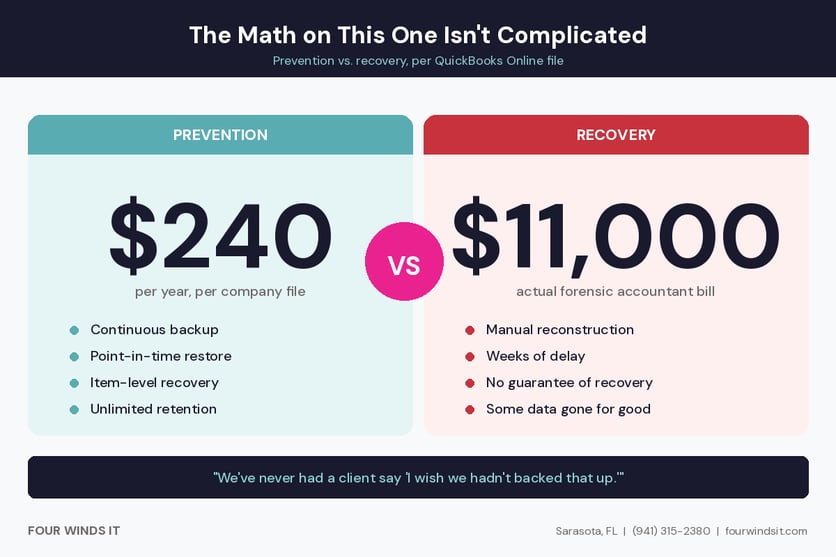
They paid a forensic accountant $11,000 to put it back together. The whole conversation could have been avoided with $240 a year of backup.
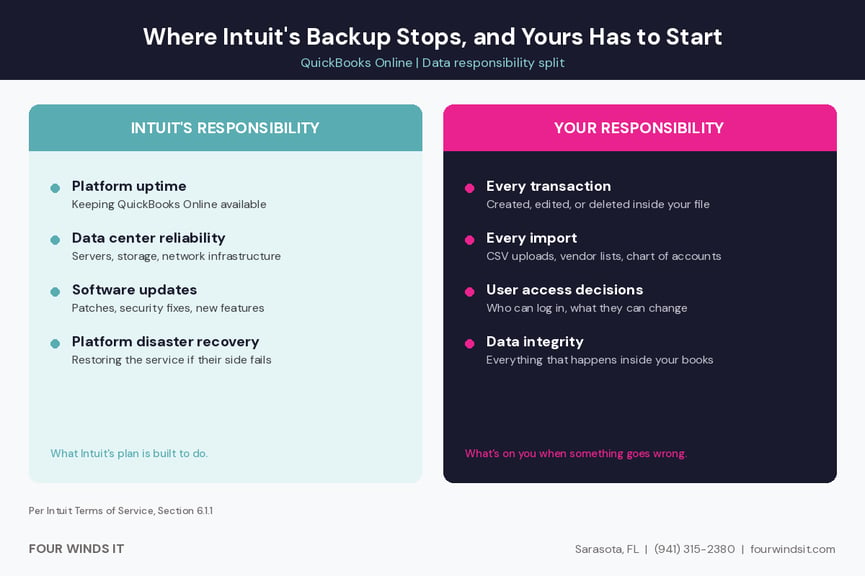
Where Intuit’s Backup Stops, and Yours Has to Start
Side by side, it looks like this.
Intuit’s responsibility:the QuickBooks Online platform. Their data centers. Their software. Their disaster recovery if a server fails. The infrastructure that makes QuickBooks Online available to you in the first place.
Your responsibility:everything that happens inside your file. Every transaction created, edited, or deleted. Every import, journal entry, user action, and access decision. The data itself.
When something goes wrong inside your file, Intuit’s backup doesn’t help you. Their system isn’t designed to roll back human action on your specific data. Their job is to keep the platform running. The platform is running. Your books are still gone.
What Real Protection Actually Looks Like
Four Winds IT now offers a continuous backup service for QuickBooks Online, built specifically for the gap Intuit’s policy leaves open. The short version:
Continuous.Every change in your QuickBooks file is captured the moment it happens. No schedules to manage. No nightly job to fail. No “we forgot to set it up last week.”
Granular.Over 40 different QuickBooks objects back up individually. Transactions, invoices, vendor records, chart of accounts, attachments, payroll data, items, classes, settings. Each piece is backed up on its own, not as one giant zip file.
Restore exactly what you need.Point-in-time recovery back to any moment. If one vendor record got deleted, restore that one record. If one journal entry needs to be rolled back, restore that entry. You’re not stuck choosing between “restore nothing” and “restore everything.”
Secured the way it should be.Bank-level encryption on the data at rest, SOC 2 audited infrastructure, multi-factor authentication on access. The same security standard we apply toMicrosoft 365 backupsfor our clients.
What It Costs, Stated Up Front
$20/ month, per QuickBooks Online company file
Billed alongside our existing services for current clients. Standalone for non-clients who just want the backup.
You’ll notice we’re telling you the price on the same page where we describe the service. That’s intentional. Four Winds IT billstransparently on everything we do. No discovery call required to get a number. No “let’s schedule a meeting to discuss your needs” before we tell you what it costs. We don’t operate that way.
The reason we keep mentioning it is that most managed IT and backup vendors don’t put their prices anywhere visible. There’s a reason for that. It’s not a good one.
A $20 Decision
The math on this one isn’t complicated.
The protection costs $20 a month. The recovery from not having it, whether that’s a forensic accountant rebuilding your books, a missed tax filing because the numbers aren’t ready, or months of records you simply cannot reconstruct, costs significantly more than $240 a year.
We have never had a client say “I wish we hadn’t backed that up.” We have absolutely had clients say “I wish we’d had a backup.”
What This Covers, and What It Doesn’t
This protection is for QuickBooks Online. It is not for QuickBooks Desktop, QuickBooks Enterprise, or any locally installed version of QuickBooks.
If you run QuickBooks Desktop or an on-premise version, the data lives on your server or workstation. For ourmanaged services clients, that data is already covered under our standard server and workstation backups. If you’re not sure which version you’re running, ask us. We’ll tell you straight.
Ready to Close the Gap?
We can have your QuickBooks Online file protected within the same business day. Existing clients can reply to the email we sent. Everyone else, call or download the overview.
Intuit backs up the QuickBooks Online platform for disaster recovery purposes. They do not back up your specific business data in a way that protects against deletion, modification, or account compromise on your side. Intuit’s own Terms of Service (Section 6.1.1) state that you are responsible for any lost or unrecoverable content.
Can I recover a deleted QuickBooks Online transaction?
QuickBooks Online has an audit log that shows recent changes, but it does not let you restore deleted data on its own. Without third-party backup in place, deleted transactions, customers, vendors, or journal entries usually have to be manually reconstructed from external records. With continuous backup, individual deleted items can be restored back to the point before they were deleted.
How much does QuickBooks Online backup cost?
Four Winds IT’s QuickBooks Online Backup service is $20 per month, per QuickBooks Online company file. That includes continuous backup of more than 40 QuickBooks objects, point-in-time restore, item-level recovery, unlimited storage, and unlimited retention.
What is the difference between Intuit’s backup and third-party QuickBooks backup?
Intuit’s backup is platform-level. It exists so Intuit can recover the QuickBooks service if their infrastructure fails. It is not designed to protect your data from deletions, bad imports, account compromise, or accidental changes made inside your file. Third-party backup is data-level. It captures your specific QuickBooks data continuously and lets you restore it independently of anything happening on Intuit’s side.
How long does it take to restore deleted QuickBooks Online data?
Most single-item restores, such as one transaction, one vendor, or one invoice, take minutes. Full company file restores depend on the size of the file. The key benefit is that you can restore exactly what you need rather than rolling back everything, which usually means most real-world restores are fast and surgical.
Four Winds IT provides managed IT, cybersecurity, cloud, and AI solutions for businesses across Southwest Florida. Sarasota, FL · (941) 315-2380 · fourwindsit.com


 Dylan Borden : Aug 3, 2026, 12:14:12 PM