
 Dylan Borden

How construction companies are solving the job site connectivity problem without expensive custom setups.
It’s 7:15 AM. Your superintendent is in the trailer at a job site 40 minutes from the office. He needs the updated set of drawings that your PM revised yesterday. He calls the office. Nobody’s in yet. He texts the PM. The PM is in the car. By the time the file gets emailed over, the crew has been standing around for 45 minutes, and the super is working from a PDF on his phone that he can barely read.
This story plays out in some version at construction companies every single day. And the cost isn’t just the 45 minutes of idle labor — it’s the rework when someone builds from the wrong revision, the frustration that drives good PMs to competitors with better tools, and the client calls asking why work hasn’t started yet.
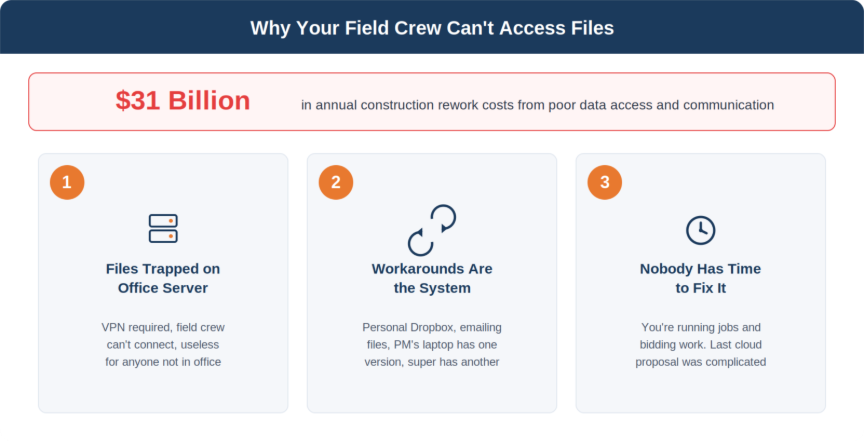
The industry puts a number on it: poor data access and communication is responsible for over $31 billion in construction rework costs annually. Your company’s share of that number is probably bigger than you think.
Why This Problem Still Exists
Most construction companies know they should have better access to files from the field. The reason they don’t usually comes down to one of three things:
The Files Live on a Server in the Office
Somebody set up a file server years ago. All your project folders, drawings, contracts, and documents live there. If you’re not in the office or connected to the VPN (which half your people can’t figure out), you can’t get to them. The server works fine for office staff. It’s useless for anyone in the field.
The Workarounds Have Become the System
People email files to themselves. They save things to personal Dropbox accounts. There’s a shared Google Drive that three people know about. Your PM has the latest drawings on his laptop, the super has last week’s version on his tablet, and accounting has the original bid documents on the server. Nobody has the same version of anything.
Nobody’s Had Time to Fix It
You’re running jobs. You’re bidding work. Your IT person (if you have one) is putting out fires, not planning infrastructure improvements. And the last time someone looked into “moving to the cloud,” the proposal was complicated, expensive, and nobody could explain what would actually change day-to-day.
What the Fix Actually Looks Like
This isn’t a rip-and-replace. You don’t need to throw out everything and start over. For most construction companies, the solution is moving your file storage to a cloud platform — typically Microsoft 365, since most of your team is already using Outlook and Office — and setting it up so your folder structure, permissions, and access work the way your business actually operates.
Here’s what that looks like in practice:
One Place for Project Files
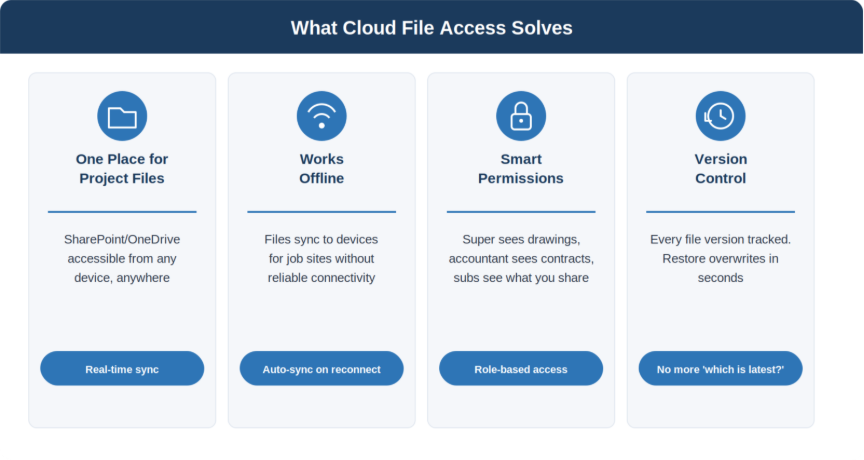
Every project has a folder in SharePoint or OneDrive that your team can access from any device — office desktop, laptop, tablet on the job site, phone in the truck. When the PM updates a drawing, the super sees it immediately. No emailing. No calling. No waiting for someone to get to the office.
It Works Offline Too
Job sites don’t always have great connectivity. The files your team needs most can be synced to their devices so they’re available even without internet. When they get back in range, everything syncs automatically. No lost work, no conflicts.
Permissions Match Your Org Chart
Your super sees the drawings and specs for his jobs. Your accountant sees the contracts and change orders. Your subs see only what you share with them. This isn’t “everyone gets access to everything” — it’s structured the way your business works, just accessible from anywhere.
Version Control Is Automatic
Cloud storage tracks every version of every file. If someone overwrites a drawing, you can restore the previous version in seconds. No more “which one is the latest?” conversations. No more lost work.
What About Our Project Management Software?
If you’re using Procore, Sage, Foundation, or any other construction-specific platform — this doesn’t replace those. Cloud file access and your PM software are separate things that work alongside each other. Your PM software handles project management workflows. Your cloud file system handles document storage and access.
What we do is make sure these systems can talk to each other where it matters and that your team can access both reliably from wherever they’re working. If your Procore files reference drawings stored in SharePoint, both need to be accessible from the field. If your accounting software needs to pull reports from the server, that connection needs to work without your office manager manually exporting files.
The goal is eliminating the information silos that cause rework and delays, not adding another platform on top of the ones you already have.
What This Actually Takes
For a typical construction company with 25–75 employees, we’re usually talking about a 2–4 week migration process. We move your existing file structure to the cloud, set up permissions, configure devices so your field staff can access what they need, and train your team on the new workflow. The file structure stays familiar — same project folders, same naming conventions. Your people just access them differently.
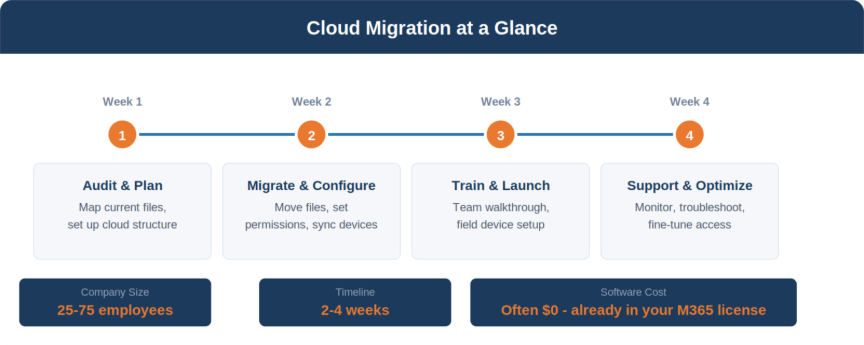
Most companies are already paying for Microsoft 365 licenses that include this cloud storage. They’re just not using it. That means the software cost is often zero — you’re already paying for the capability, it just hasn’t been set up.
If you’re not sure what your current Microsoft licenses include, we put together a Microsoft 365 Licensing Guide that breaks down exactly what you’re paying for and what you might be leaving on the table. It’s worth a read before your next renewal.
The Real Cost of Doing Nothing
Every week that your field team can’t access current documents from the job site, you’re absorbing costs you don’t see: idle labor waiting for information, rework from outdated drawings, PM time spent playing telephone between field and office, and the slow erosion of your reputation when things take longer than they should.
The fix isn’t complicated. It’s not expensive. It just needs to be done by someone who understands how construction companies actually work — not a tech company that’s going to hand you a generic cloud migration playbook and wish you luck.
FAQ: Cloud File Access for Construction Companies
How do construction companies access files from the job site?
The most effective approach is moving project files to cloud storage like SharePoint or OneDrive through Microsoft 365. Field crew can access current drawings, specs, and documents from any device — phone, tablet, or laptop. Files sync automatically when the PM makes changes in the office, and offline access ensures files are available even without reliable connectivity on site.
Does cloud file storage work without internet?
Yes. Cloud platforms like OneDrive and SharePoint allow files to be synced to devices for offline access. The files your field team needs most are downloaded to their device and available without internet. When they reconnect, everything syncs automatically with no lost work or version conflicts.
Does SharePoint replace Procore or other construction software?
No. Cloud file storage and construction project management software serve different purposes. Procore, Sage, Foundation, and similar platforms handle project management, scheduling, and budgeting. SharePoint and OneDrive handle file storage and access. They work alongside each other — the goal is making sure both systems are accessible from the field and that they can reference each other where it matters.
How long does a cloud migration take for a construction company?
For a typical construction company with 25 to 75 employees, a cloud file migration takes 2 to 4 weeks. This includes moving your existing file structure, setting up permissions, configuring field devices, and training your team. Your day-to-day operations continue normally during the migration.
Are we already paying for cloud storage we’re not using?
Very likely. Most construction companies already pay for Microsoft 365 licenses that include SharePoint and OneDrive cloud storage. The capability is included in your existing subscription — it just hasn’t been configured. That means the software cost for cloud file access is often zero. If you’re not sure what your licenses include, check out our Microsoft 365 Licensing Guide.
Not sure where your company stands?
We’ll take a look at your current setup, your Microsoft licensing, and how your team accesses files today. Then we’ll tell you what it would take to fix it — and whether it’s worth doing now or can wait. No sales pitch, just an honest assessment.

